If your tourism website gets hacked, call your web person and the Australian Cyber Security Hotline on 1300 CYBER1. Take the site offline, change passwords from a clean device and write down what happened. Then check whether the law says you must tell your guests and the OAIC.
This week a Tourism Tribe member’s website was breached through a weakness in one of its plugins. They were keeping things updated and changing passwords. The bad guys still found a crack. This post is the game plan we want every operator to have printed and in a drawer before that day comes.
Quick links
- Why do tourism websites get hacked through plugins?
- What should you do in the first hour after a hack?
- Do you have to tell the OAIC and your guests?
- Who should get access to what?
- Is your AI building safe plugins?
- What should you ask your insurance broker about cyber cover?
Why do tourism websites get hacked through plugins?
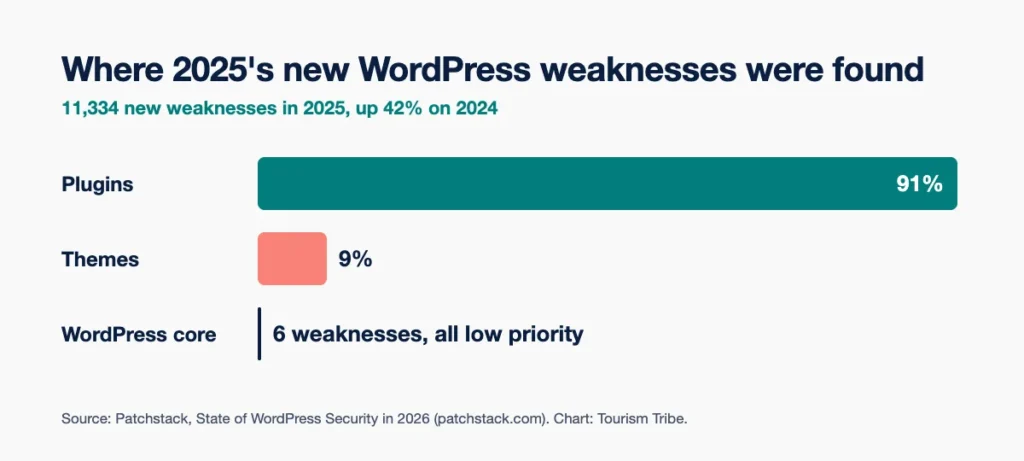
Most new WordPress weaknesses sit in plugins. Patchstack, a company that sells WordPress security tools, counted 11,334 new weaknesses in WordPress and its add-ons in 2025. 91% sat in plugins and 9% in themes. WordPress core had six, all low priority.
A plugin is software from a separate developer. The booking widget, the gallery, the contact form, the pop-up. Every one you add is another door that someone has to keep locked.
Updates matter. They don’t close every door. Patchstack found 46% of weaknesses had no fix from the developer by the time they went public. The most heavily attacked ones were typically exploited within about five hours of going public (Patchstack’s weighted median).
The Australian Signals Directorate’s Australian Cyber Security Centre (ACSC) keeps seeing incidents from unpatched software. Its Annual Cyber Threat Report 2025-26 says AI is cutting the skill and effort needed to find and exploit weaknesses. For a small business, the average self-reported cost was $55,400 per cybercrime report to the ACSC, across all types of cybercrime.
You need the locks. You also need a plan for the day after.
What should you do in the first hour after a hack?
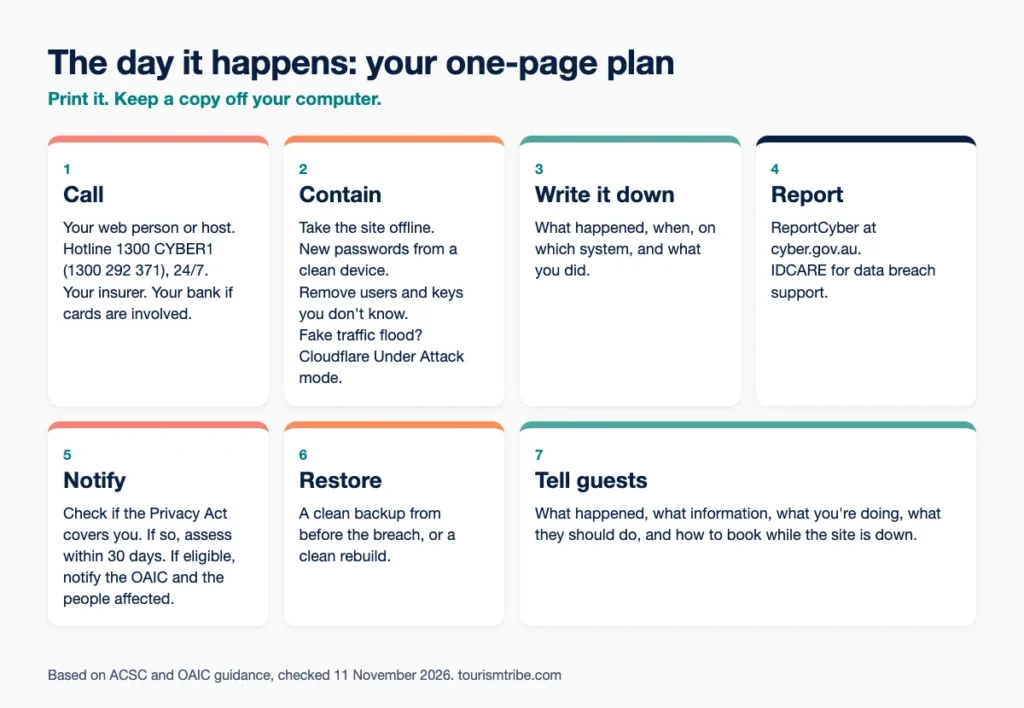
Call for help, then contain the damage. The ACSC’s advice is to act fast: disconnect, change passwords and record what happened (Recover from hacking).
Who to call:
- Your web developer or host. If Tourism Tribe looks after your website, call us straight away.
- The Australian Cyber Security Hotline on 1300 CYBER1 (1300 292 371). It runs 24 hours a day, 7 days a week.
- Your insurer or broker, if you have cyber cover. Ask what they need from you before you hire anyone.
- Your bank, if card or bank details are involved.
How to contain it:
- Take the website offline or put it in maintenance mode.
- Change passwords from a clean device, not the one you suspect.
- Remove any user, API key or token you don’t recognise. In Cloudflare, check My Profile > API Tokens and Manage Account > Members.
- Treat every login the website reaches as exposed. That means hosting, the database, email accounts, the domain registrar, and the keys for payments, the booking engine, email sending and analytics.
Write it down. The ACSC asks for what happened, when, on which platform and how you responded. Then report it through ReportCyber at cyber.gov.au. For help with a data breach, contact IDCARE, the national identity and cyber support service.
A hypothetical example. A 12-room guesthouse finds spam pages on its website at 7am on a Saturday. The owner rings the web developer, who takes the site offline by 8am. The owner calls 1300 CYBER1 for advice. Then, on a different laptop, they change the booking engine password. At 9am they post on Facebook: “Our website is down for maintenance. Book by phone.” Then comes the human decision. Did the breach touch guest details, and does the law require a notice?
When to use Cloudflare’s Under Attack mode
If your domain runs through Cloudflare, you have one more switch. Cloudflare’s Under Attack mode runs extra checks on every visitor. Real visitors get through. Suspicious traffic gets blocked.
Turn it on when a flood of fake traffic is knocking your website over. In the Cloudflare dashboard, open your domain and switch on Under Attack Mode under Quick Actions. Cloudflare calls it one of the last resorts.
The trade-offs:
- Visitors see a check page first, and access pauses while it runs.
- Your analytics numbers take a hit.
- The check needs JavaScript in the browser. Our advice: test your booking button while it is on.
In our experience it won’t clean a hacked website or close the hole in a plugin, so treat it as a shield, not a fix. Turn it off once the flood stops. Not sure whether you are on Cloudflare? Our admin access guide shows how to check in a minute.
Getting the website back
Restore from a backup taken before the breach, once the weakness is closed. Your specialists decide which backup is clean.
If nobody knows when the attacker got in, a backup carries the infection straight back. For a badly compromised site, our rule is a clean rebuild with no old database, users, plugins or theme. Every exposed password and key gets changed. If Google flagged your website, ask for a review in Google Search Console under Security Issues.
Do you have to tell the OAIC and your guests?
It depends on whether the Privacy Act covers your business. The Notifiable Data Breaches scheme applies to businesses the Act covers. The Office of the Australian Information Commissioner (OAIC) says most small businesses with annual turnover of $3 million or less are not covered.
Check the exceptions before you relax. The OAIC lists businesses that are covered whatever their turnover. They include:
- health service providers (the OAIC’s checklist names complementary therapists, so if you offer treatments, work through the checklist or ask a lawyer)
- businesses that trade in personal information, such as selling or swapping a mailing list
- businesses related to a covered business
- businesses holding a Commonwealth contract
- businesses that opted in.
Turnover means all income from all sources. If you have had more than $3 million in any financial year since 2002, the OAIC says you need to comply. Employers who hold staff tax file numbers carry obligations for that information too.
If you are covered, a breach is “eligible” when three things are true (OAIC). Personal information was accessed, disclosed or lost. It is likely to cause serious harm. And quick action didn’t remove that risk. You must take all reasonable steps to finish assessing a suspected breach within 30 calendar days. The OAIC expects it much sooner. If it is eligible, notify the OAIC and the people affected as soon as practicable.
Unsure? Ask a lawyer. The OAIC says its own checklist is no substitute for legal advice.
Tell guests anyway. The ACSC’s small business handbook says affected customers should be told if their data was compromised. Keep the message plain:
- what happened and when
- what information was involved
- what you are doing about it
- what they should do, such as watching for scam messages that pretend to be you, because scammers use breach data (ACSC)
- how to reach you, and how to book while the website is down.
Who should get access to what?
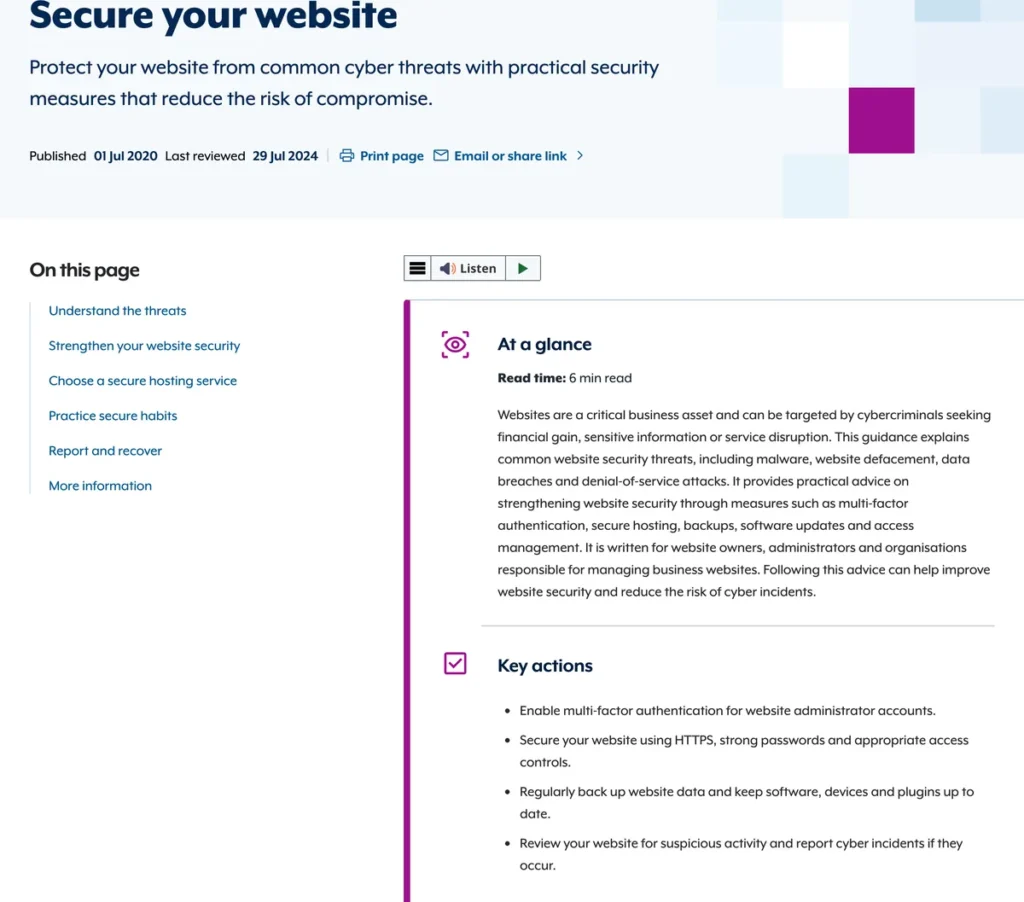
You hold the keys. Everyone else gets their own login, with only the access their job needs. The ACSC says to limit website admin access to the people who need it. Remove access when someone leaves or changes roles (Secure your website).
We call this getting your ducks in a row. Our guide, Don’t get locked out of your digital front door, lists the ten accounts you need admin access to. They run from the website and domain registrar to the booking system and password manager. On the day of a hack, those logins decide how fast you act. Without them, you wait for someone else to wake up.
Here is how we set access on the websites we build. Some of it is the ACSC’s advice, the rest is our own rule:
- You, the owner: admin on everything. Website, domain, Cloudflare, email, Google, booking system. Saved in a password manager, never in an inbox or spreadsheet.
- Staff: their own login, as an Editor on the website, not an Administrator.
- Your web developer (or us): their own admin login, under their own name or business email. Never yours.
- Cloudflare: you stay the Super Administrator. Your developer works through a limited key made in your account, which you see and cancel any time.
- AI tools: their own login with the lowest role that does the job. Never paste a password, key or recovery code into an AI assistant.
- Specialists after a hack: our rule is their own temporary logins, removed when the work is done.
- Anyone who leaves: the ACSC says remove access when it is no longer needed. We do it the same day.
Two-factor login goes on every one of those accounts.
Five things to do this week
- Count your plugins. If you don’t know what one does, ask your developer whether you still need it. On a website we built, ask us before you remove anything. Our sites run a short, fixed plugin list, unused themes get deleted, and nothing comes from “GPL club” or nulled download sites.
- Turn on two-factor login for every admin account. The ACSC lists this first for website admins.
- Check your ducks. Work through the admin access list and remove anyone who has left.
- Ask your host three questions. How often do you back up? Where are the backups stored (the ACSC says offsite is safer)? When did you last restore one?
- Write the one-page plan from this post and print it. The ACSC’s small business handbook says to keep a copy offline, because your systems might be the thing that’s down.
For phishing and passwords, read our 10 ways to protect your tourism business from cyber security threats. For bushfires and blackouts, use our crisis-ready checklist.
Is your AI building safe plugins?
Only if someone checks its work. AI tools now write plugins and edit websites on request. Patchstack says agencies generate plugins on demand, and that securing a WordPress site now means covering custom-coded plugins too.
We build websites with AI agents ourselves. Here is the rule we hold them to (our own process, not a legal standard). The AI writes the code. A second, independent AI model reviews it. A human approves it. The code lives in GitHub, and only the approved version goes on the website. Content changes start as drafts, never as live edits.
Our reading: a plugin your AI wrote has no outside developer shipping security updates. That makes you, or your developer, the maintainer.
Ask these questions about any AI-built plugin on your website:
- Who reviewed the code before it went live?
- Where is the code kept, and who updates it?
- Was it tested on a copy of the website first?
- What access does it need, and would it work with less?
The same goes for an AI that edits your website or runs tasks for you. The ACSC’s advice for AI agents is to give the minimum access the task needs and check what it reaches. Keep your own review over important changes (Using AI securely in your business). Verify what the AI produces rather than relying on it alone. Our guide on how to connect AI safely to your tourism business covers the inbox side.
What should you ask your insurance broker about cyber cover?
Search your current policy for the word “cyber” first. business.gov.au lists cyber and privacy liability as one part of many management liability packages.
According to business.gov.au, cyber insurance helps with the costs of cybercrime. Depending on the policy, that includes cyber extortion or ransomware, business interruption from a cyber event, and data breaches including data recovery. It extends to the accidental loss or release of customer personal information. The Insurance Council of Australia adds forensic investigation, customer notification such as call centres, and penalties from government regulators. Every product differs.
Questions to take to your broker:
- Does my policy cover cyber, or exclude it? Which clause?
- Am I covered if a plugin, my web host or my booking system is the cause?
- Does it pay for forensic specialists, rebuilding the website and notifying guests?
- Does it cover bookings lost while the website is down? Is there a waiting period?
- Does it cover ransom or extortion?
- Does it cover legal costs and regulator penalties?
- What security steps must I have in place for a claim to pay?
- Who do I call first, and must I use your specialists?
- What are the limit and the excess?
- Does it cover a breach that started before the policy began?
Get the answers in writing.
Frequently Asked Questions
What should I do first if my tourism website is hacked?
Call your web developer or host, and the Australian Cyber Security Hotline on 1300 CYBER1 (1300 292 371). Take the website offline and change passwords from a clean device. Write down what happened, when, and what you did.
Do small tourism businesses have to report a data breach?
Most businesses with annual turnover of $3 million or less sit outside the Notifiable Data Breaches scheme, according to the OAIC. Some are covered whatever their size, including health service providers and businesses that trade in personal information. Report the incident to the ACSC through ReportCyber either way.
Does keeping plugins updated stop a website hack?
Updates close known weaknesses, and the ACSC keeps seeing incidents from unpatched software. Patchstack found 46% of new WordPress weaknesses in 2025 had no fix by the time they went public.
What does Cloudflare’s Under Attack mode do?
Under Attack mode runs extra checks on visitors to a website on Cloudflare, letting real visitors through and blocking suspicious traffic. Cloudflare calls it one of the last resorts for floods of fake traffic. It is a shield, not a clean-up, so turn it off once the flood stops.
Is it safe to let AI build a plugin for my website?
Our rule is a review step. Have someone other than the AI check the code. Test it on a copy of the website, and keep the code where someone updates it. The ACSC says not to rely on AI output alone, and to keep human oversight of important business decisions.
What does cyber insurance cover for a small business?
According to business.gov.au, a cyber policy helps with costs from cyber extortion or ransomware, business interruption, and data breaches including data recovery. Some also cover the loss or release of customer personal information. Policies differ, so ask your broker what yours includes and excludes.
Conclusion
The bad guys always find a crack. Your job is to keep the crack small and the recovery fast. This week, check your ducks, count your plugins, print the plan and ring your broker.
This post is general information, not legal or insurance advice. For your own situation, talk to a lawyer and a licensed insurance broker.
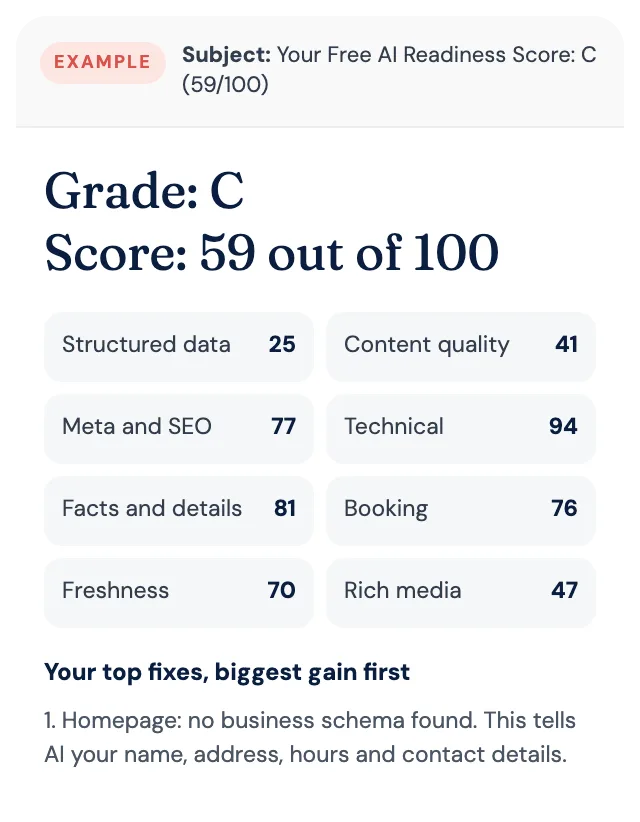
Free AI Readiness Score
How well does AI read your website?
Get your grade, a score out of 100 and your top fixes, by email. Free for tourism operators. No login and nothing to install.