

Your AI-written Google posts sound the same because you give the AI the same facts every time. Give it something new each week instead: a fact from your week, a question a guest asked, a local event. Then rotate Google’s three post types, Update, Offer and Event, so each post does a different job. That’s eight posts a month at our recommended two a week, and each one says something new.
- Why do AI-written Google posts all sound the same?
- Which Google post types should you rotate?
- What should you give the AI each week?
- What prompt writes a month of Google posts?
- How do you check and schedule a month of posts?
Why do AI-written Google posts all sound the same?
The AI has nothing new to say. Same facts in, same post out.
When you give AI a one-line prompt, it writes “the average of everything it has read about your topic”. Our post on why AI content sounds like AI covers the fix for your voice: a one-page brief.
A brief fixes the voice. It doesn’t fix the news. Your fact sheet from writing your Google Business Profile description with AI barely changes from month to month. That’s right for a description. For posts, it means the AI reaches for the same three facts every week. Your river. Your guide. Your sunsets.
Google notices too. Its tips for posts say: “Avoid misspelled words, extra characters, text that adds no value and auto-generated or distracting content.”
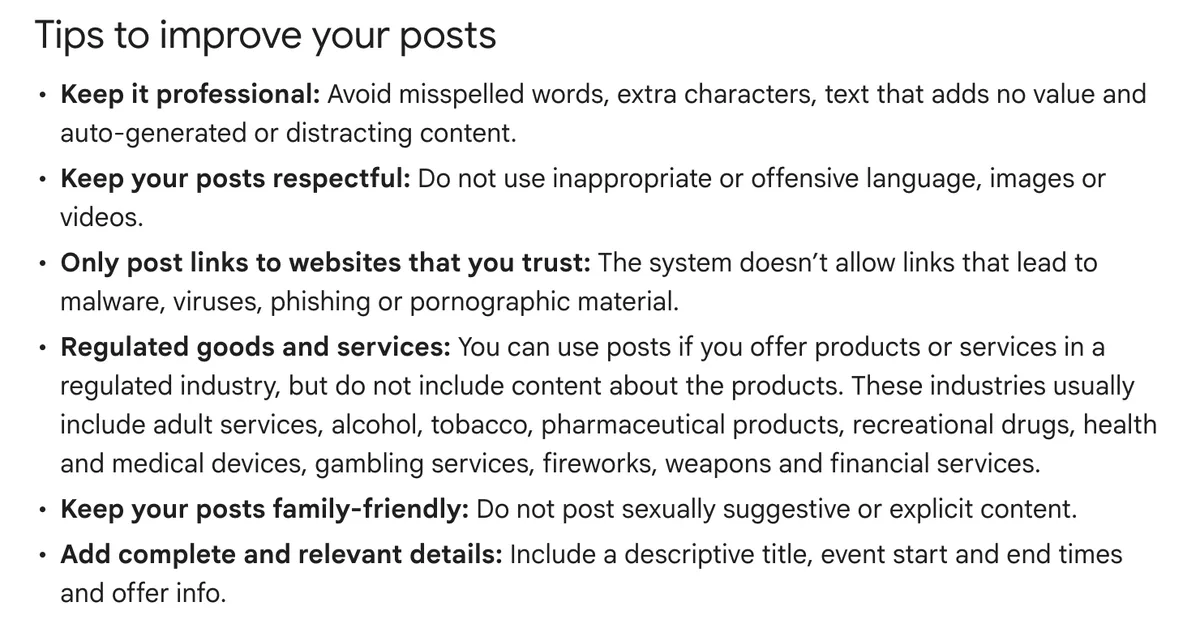
Our reading: AI drafts are fine. Empty ones aren’t. A post that tells travellers the creek is running again adds value, because nobody else knows it. A post about “unforgettable experiences” adds nothing. We treat AI as a drafter, not a publisher. You add the news and you check the post.
Specific details matter more since Google’s March 2026 core update. Google now weighs first-hand experience and fresh content more heavily, and specific named details outrank generic descriptions. Our Google Business Profile recap has the details.
Which Google post types should you rotate?
Rotate all three: Update, Offer and Event. Each type asks the AI for a different kind of post. The month stops sounding like one post written eight times.
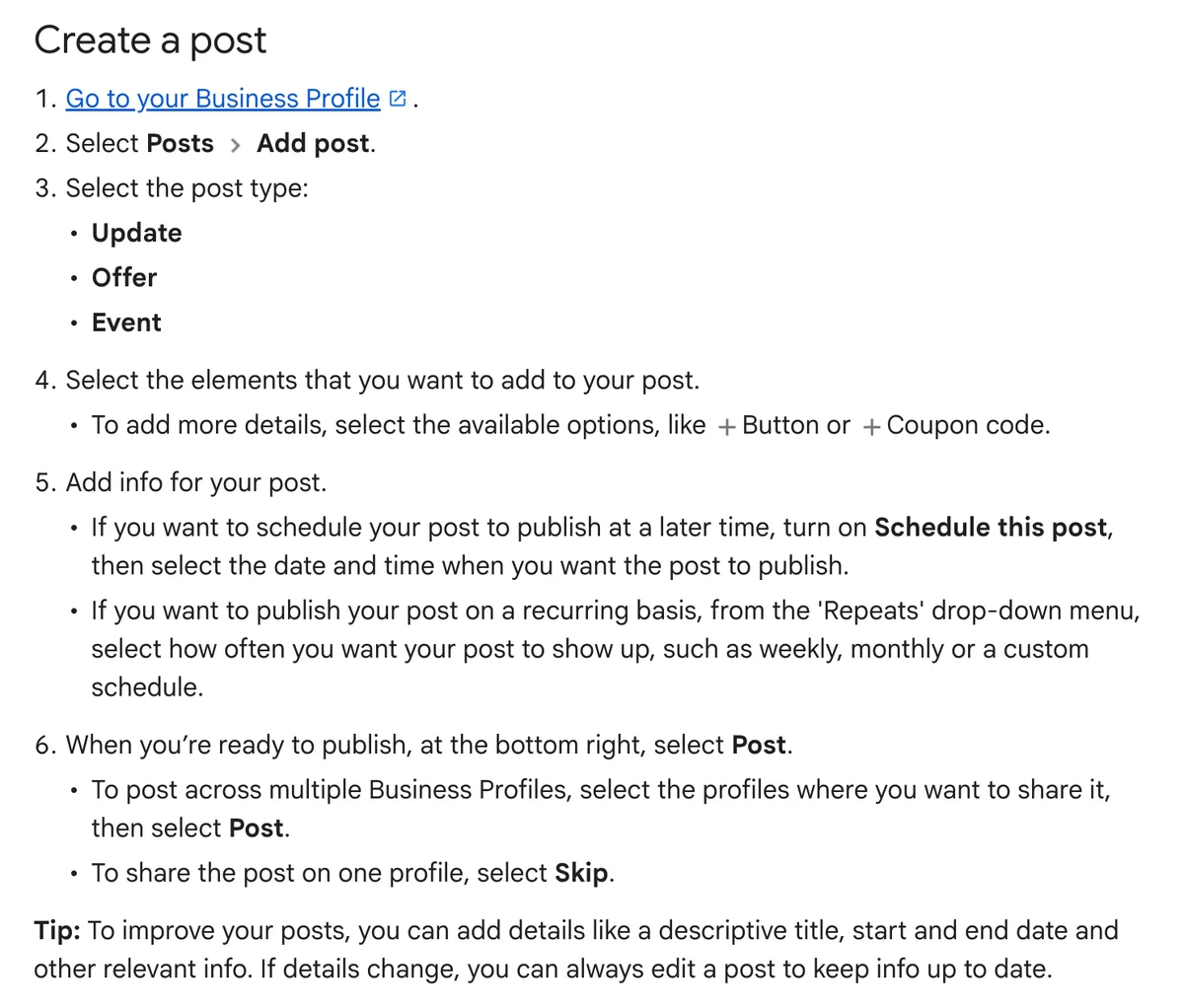
Here’s what each one needs, from Google’s help page:
- Update. News about your business. Add a photo or video and a button with a link, for example to book or learn more.
- Offer. A deal or package. Google requires a title, dates and a time. A coupon code and terms are optional.
- Event. Something on at your business. Google asks for a title, start and end dates, and times.
Offers and Events carry dates. That tells Google you have something extra on between those dates. It gives Google’s AI one more reason to mention you. Post a separate Event for each date. A general “what’s on” post has no dates for Google to match.
Here’s a rotation for a month of eight posts:
| Week | Post 1 | Post 2 |
|---|---|---|
| 1 | Update: something new this week | Event: your next date |
| 2 | Update: answer a guest’s question | Offer: a dated deal or package |
| 3 | Update: a local event or regional story | Update: share your newest blog post |
| 4 | Update: behind the scenes, with a new photo | Offer or Event: what’s on next month |
Change the order to suit your season. Keep the mix.
Two shortcuts help. Google lets you schedule a post for a later date. Its “Repeats” menu also publishes the same post again weekly, monthly or on a custom schedule. Use Repeats for a fixed weekly event, such as a Sunday market tour. Don’t use it to dodge writing new posts.
Wineries, breweries and distilleries, read Google’s rule on regulated goods. Alcohol is on Google’s list, and the rule says to leave out “content about the products”. Our reading: post about the tour, the cellar door hours or the long lunch, not the wine itself.
What should you give the AI each week?
Give it week notes: five or six short dot points about what happened this week. Keep them on your phone and paste them in when you write.
Good week notes come from five places:
- What changed. The first whales of the season. A new menu. Rain filled the dam. A new guide started.
- Questions guests asked. Post about the things people ask or search for. If three guests asked about parking this month, that’s a post.
- Local events and stories. A festival, a show or a race weekend in your region. Mention it, and offer a package if you have one.
- Your newest blog post. Share it as an Update with a Learn more button that links to the article.
- Review themes. Note what guests keep praising. Reviews are a brief, not copy. Never paste a guest’s sentence into a post.
Add a photo from this week to every post. Old brochure shots don’t count as news.
Speak your notes if typing is slow. ChatGPT, Claude and Gemini all have a microphone button. You give more detail when you talk than when you type. Our AI in Tourism Playbook has more on this.
Hypothetical example. A farm stay two hours from the city asks the AI for four Google posts. It gives the AI only its fact sheet, and it gets four versions of “escape to the country”. The next month, the owner keeps week notes. Lambing started on Tuesday. Rain filled the dam. A guest asked if children help at feeding time. The town show is on the third Saturday. The AI now writes four different posts. An Update about the lambs. An Update that answers the feeding question. An Event for show weekend. An Offer for midweek stays during the show. Each one names something a traveller might ask their phone about.
What prompt writes a month of Google posts?
A good prompt holds your facts, your week notes, the rotation and the rules for Google posts. Paste this into ChatGPT or Gemini, then paste your fact sheet and week notes under it.
You write Google Business Profile posts for my business. Use only the facts I give you. Don’t invent anything.
Write eight posts for the next four weeks, two per week, in this order: [paste the rotation].
Rules:
- Each post uses a different fact from my week notes. Never use the same fact twice.
- Never start two posts with the same word.
- Name one specific thing in every post: a place, a date, a dish, an animal or a person’s role.
- Two to four sentences per post.
- No emojis. No words in capitals. No hashtags.
- No phone numbers, email addresses or social media handles.
- Australian English.
- For each Offer and Event, give me the title, dates and times. If I haven’t given you a date, ask me.
- Suggest a button for each post (Book, Learn more or Call now) and, for Book or Learn more, the page it links to.
- If a detail is missing, flag it. Don’t guess.
My fact sheet: [paste]
My week notes: [paste]
Why these rules?
- No emojis or capitals. We leave them out of Google posts. Google’s tips warn against extra characters and distracting content.
- No phone numbers. Google says a post with a phone number it can’t verify as yours might get rejected. Its content policy covers email addresses and social media handles too. Add a Call now button instead. It uses the number on your profile.
- Write for Google. Keep these separate from your Instagram and Facebook posts. A caption written for Instagram reads oddly on Google.
Save the setup so next month takes less work. Put your fact sheet, voice notes and this prompt into one saved assistant. That’s a Gem in Gemini, or a Project in ChatGPT. Call it “Google posts”. Each month, open it and paste in your new week notes.
When a post comes out wrong, fix the Gem’s instructions, not the post. If the AI keeps opening with “Escape to…”, add “never start with Escape” to the rules. The fix then holds for every post after it.
Which tool? Either works when it has your facts. We lean towards Gemini for Google profile work because it’s Google’s own tool.
How do you check and schedule a month of posts?
Check each post against your own records, then schedule all eight in one sitting. AI invents details. It puts a date on the wrong Saturday or keeps an offer running past its end date.
Run through this before you schedule:
- Dates and times. Every Offer and Event matches your calendar.
- Offer terms. Prices, inclusions and end dates match what you sell.
- One new fact. Each post says something the other seven don’t.
- Google’s rules and ours. No phone numbers, no emojis, no words in capitals.
- The guest test. Read it out loud. Would you say this to a guest?
Then schedule. In your Business Profile, choose Posts, then Add post. Turn on “Schedule this post” and pick the date and time. Manage more than one profile? Google lets you post to several at once. Write a separate post for each location if their news differs.
Plan the month in one sitting. Twice a week is our target. One a week is a start. Our post on tracking AI traffic and improving your Google Business Profile explains why regular posting matters for Google and its AI Overviews.
Old posts don’t stay up forever. Google’s help page says: “Posts older than six months are archived unless a date range is set.” Fresh posts keep your profile current.
Posts are one part of an active profile. Replies to reviews are another. Our guide to replying to Google reviews with stars but no text covers those.
Frequently Asked Questions
How often should I post on my Google Business Profile?
Twice a week is our target. One post a week is a start. Regular posting shows Google your business is active. Plan and schedule the month in one sitting so the posts go out on time.
Is it OK to use AI to write Google Business Profile posts?
Yes, when the AI drafts and you check. Google’s tips ask you to avoid text that adds no value and auto-generated content. Give the AI a new fact for every post, then check each one against your records before it goes live.
Why does ChatGPT keep writing the same Google post?
It gets the same facts every time. A fact sheet describes your business, but it doesn’t change week to week. Add week notes with something new, and rotate Updates, Offers and Events so each post does a different job.
Should I put my phone number in a Google Business Profile post?
No. Google says a post with a phone number it can’t verify as yours might get rejected. Add a Call now button instead. It uses the verified number on your profile.
Should I use emojis in Google Business Profile posts?
We leave them out, along with words in capitals and hashtags. Google’s tips warn against extra characters and distracting content. Write Google posts in plain sentences, separate from your Instagram captions.
Do Google Business Profile posts expire?
Google archives posts older than six months unless a date range is set. Offers and Events carry their own dates. Keep posting so your profile always shows something current.
Conclusion
The AI writes something new when you give it something new. Start a week notes list today, run the prompt at the end of the month, and schedule all eight posts. Want to see what AI tools say about your business right now? A GEO Assessment tests it and shows what to fix first.

Your free AI marketing coach, right in your pocket
The free Pocket Rocket app gives you a personal AI marketing coach, website audit, weekly action plans and 5-minute tips. Built for tourism operators.