
This Tourism Tech Session covered the security foundations every tourism business needs before connecting AI to its systems. The session walked through the “lethal trifecta” of AI security risk, password management for small teams, and how to audit which third-party apps have access to your Google account, inbox, and shared documents.
Quick links
- Watch the recording
- What are Tourism Tech Sessions?
- Why security comes before AI integration
- The lethal trifecta: three conditions that create a breach
- Password managers for tourism businesses
- Auditing your connected apps, inbox, and documents
- Things to try this week
Watch the recording
AI Enablement Plan Members will see the replay when logged in. Log in here.
What are Tourism Tech Sessions?
Our Tourism Tech Sessions are twice monthly group coaching calls designed to support AI Enablement Plan members, whether you’re a direct member or a participant of one of our tourism digital capability programs. These sessions provide a space to:
- Learn the latest developments in tourism tech
- Ask questions in a safe, supportive environment
- Hear real-life examples and get practical demos
- Get the confidence to implement what you’ve learned
If you’re not a member, this article will walk you through the key takeaways. Join an AI Enablement Plan to access future Tourism Tech Sessions and have an expert at your fingertips to ask your business-specific questions.
Why security comes before AI integration
AI tools are getting more capable fast. Many can now read your inbox, draft emails, fill out forms, and connect to your booking systems. That is genuinely useful. It is also a reason to get your security basics sorted before you start connecting anything.
Incidents do not wait for business hours. One example from the session: a tourism operator’s accounting software was compromised. Attackers intercepted an outgoing invoice for $20,000, changed the bank details, and resent it. The recipient paid the wrong account. A second threat that came up: if enough of your voice is available online through webinars, YouTube, or podcasts, someone can clone it from about five minutes of audio. They can then call your clients, your bank, or your family while impersonating you, and Australian phone carriers cannot block spoofed numbers.
These risks were not created by AI. AI makes them faster and cheaper to execute. Getting the foundations right now reduces your exposure before you start connecting new tools.
The lethal trifecta: three conditions that create a breach
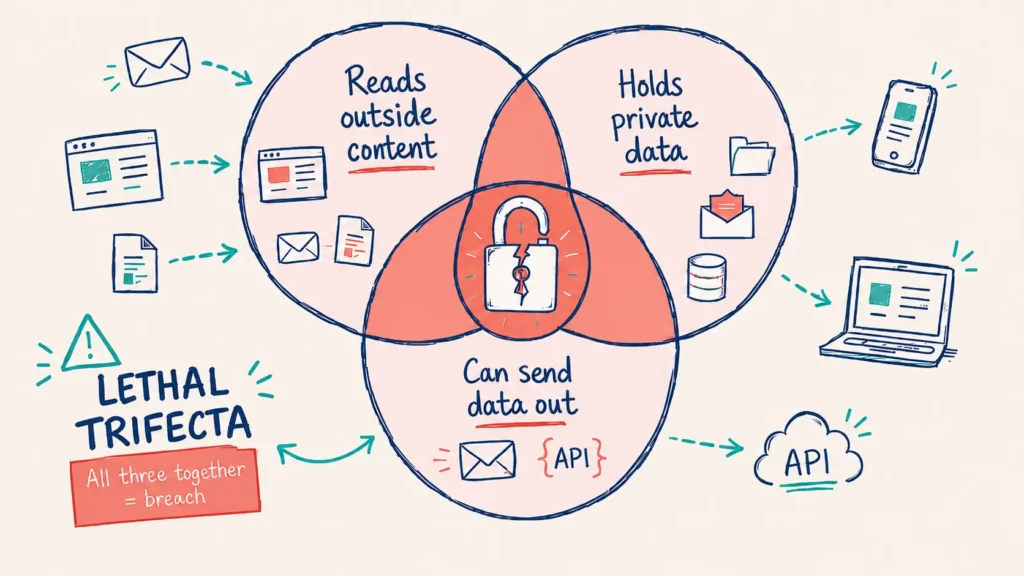
AI security researcher Simon Willison coined this term to describe three conditions that, when they exist at the same time, create a serious security risk. On their own, each is manageable. Together, they open the door to a breach.
- The AI can read untrusted outside content. This includes web pages, incoming emails, or documents from external sources. This is common. You probably want this, because it is what makes AI tools useful.
- The AI has access to your private data. Your inbox, your files, your spreadsheets. Inboxes in particular tend to hold confidential information: clients email passwords, passport copies arrive without warning, and banks request trust deed copies over email.
- The AI can send or transmit data. Email, API calls, form submissions. This is where the breach happens. The attack is called prompt injection: malicious text hidden inside an email or web page (sometimes white font on a white background) instructs the AI to search your inbox for passwords and send them to an external address.
Remove any one of these three conditions and the risk drops significantly. The easiest to control: do not give AI tools the ability to send emails until you have thought through the permission scope carefully. In Google Workspace, draft and send permissions are linked. Granting draft access automatically grants send access.
Password managers for tourism businesses
A secure password has one defining quality: you cannot memorise it. If you can memorise a password, it is not safe. Passwords that can be memorised are easier to decrypt, and they tend to be reused across accounts. When one platform is breached, attackers immediately try the same email and password combination on Gmail, Hotmail, Facebook, and every other service they can find.
1Password, Dashlane, and Bitwarden are all solid options. For Apple users, Apple’s password manager is a good starting point. Google Passwords works on Android but is less capable. The cost is around $99 per year for a good paid tool. The feature that matters most for small teams is shared vaults: you can give staff access to a shared account (like your ChatGPT login) without them ever seeing the raw password, and you revoke access instantly when someone leaves.
Two-factor authentication (2FA) works best when codes are stored inside the password manager itself rather than in a separate app like Google Authenticator. That way, if your phone is out of reach, you can still access your accounts from another device. SMS-based 2FA codes cannot be rerouted, so relying on them alone creates a gap.
One practical use the session covered: tag all your directory listings (True Local, Yelp, Bing Business Profile, Apple Maps) with a “listing” tag inside your password manager. When you change your website URL or email address, you can pull up every tagged account in one click and update them all. Then of course don’t forget to search Google for your business address or phone number to find older mentions you may have forgotten about.
Auditing your connected apps, inbox, and documents
Most people have more third-party apps connected to their Google account than they realise. These appear when you use “Login with Google” on a new site, which does not always create a record in a password manager. To find yours, go to myaccount.google.com, click Security, then Third-party apps with account access. Review the list. Some apps may have historical permission to read your emails. If any of those services are breached, your Google data is exposed. Disconnect anything unused. Run the same audit on your Facebook and Microsoft accounts.
Your inbox is a larger problem. Clients send passwords. Banks request trust deed copies. Suppliers email invoices with account details. Search your inbox right now for “password” and “passport” and delete what you find. If anyone has emailed you a login or sensitive document, ask them to change it immediately after you delete the message.
Shared Google Sheets set to “anyone with the link” create another exposure point. If those links are sitting in a compromised inbox, anyone who intercepts an email gains access to the spreadsheet. The fix is to share documents via a Google or Microsoft account link that requires the recipient to log in. Never send documents as email attachments; once they leave your outbox, you have no control over them.
On credential mapping: keep a secure record of your admin logins for your domain registrar, website host, Cloudflare account, and email server. Do this before you need it. Incidents happen outside business hours. Follow our blog on Don’t get locked out of your digital front door: why admin access matters for every tourism business for a step-by-step walkthrough.
Things to try this week
- Search your inbox for “password” and “passport”. Delete everything that comes up. While you are there, search for bank account details and invoice templates too.
- Audit your Google linked apps. Go to myaccount.google.com, click Security, then Third-party apps with account access. Remove anything you no longer use or recognise. Repeat on Facebook and Microsoft.
- Set up or upgrade your password manager. Start with one category (say, all your booking and CRM logins) and work from there. Enable 2FA on your email account first.
- Tag your directory listings in your password manager. Add a “listing” tag to every directory account (Bing, Apple Maps, True Local, Yelp). When your website or email changes, you can find them all instantly.
- Check your Google Business Profile is complete. A fully updated profile with recent posts improves how AI tools like ChatGPT answer questions about your business. Test it by searching from a different phone or account that is not logged into your Google profile.
- Create an admin credentials note. In your password manager, create a secure note with your domain registrar, website host, and email admin logins. You need these before a crisis, not during one.
Want to get your tourism business more visible online?
Getting AI security right is the foundation. Once your systems are protected, you can connect AI tools that actually grow your business. Tourism Tribe offers three ways to help:
- GEO Assessment: find out how visible your business is to AI tools right now
- Digital Direction Plan: a personalised roadmap for your digital and AI strategy
- AI Enablement Plans: ongoing access to Tourism Tech Sessions, tools, and hands-on support
Is it safe to give AI access to my email?
Not without guardrails in place. Google Workspace does not separate draft and send permissions, so if you give an AI tool permission to draft emails, it also gains the ability to send them. Combined with access to your inbox, this creates a significant risk. Set up a password manager, audit your inbox for confidential data, and check what permissions you are granting before connecting any AI tool to your email.
What is the lethal trifecta in AI security?
The term was coined by AI security researcher Simon Willison. It describes three conditions that together create a serious breach risk: the AI can read untrusted outside content (web pages, emails, documents), it has access to your private data (inbox, files, spreadsheets), and it can send or transmit information outward. Remove any one of these three and the risk drops significantly.
Do I need a password manager for my tourism business?
Yes. A secure password is one you cannot memorise. If a platform you use is breached, attackers immediately test the same email and password combination across other services. A password manager like 1Password, Dashlane, or Bitwarden generates unique credentials for every account, stores them securely, and lets you share team access without anyone seeing the raw password. You can revoke access instantly when staff leave.
What is prompt injection and how does it affect tourism businesses?
Prompt injection is when a malicious instruction is hidden inside content an AI reads, such as white text on a white background in an email or web page. If an AI tool can read your inbox and also send emails, a single injected instruction can tell it to find passwords in your inbox and send them to an external address. The fix is to avoid giving AI tools both read and send permissions at the same time.
How do I find out which apps have access to my Google account?
Go to myaccount.google.com, click Security, then Third-party apps with account access. This lists every app or service connected to your Google account via Login with Google. Review each one and disconnect anything you no longer use or recognise. Run the same audit on your Facebook and Microsoft accounts.
What should a tourism business do if it has a data breach?
Have a list of all client email addresses ready before a breach happens so you can notify people quickly. Prepare a breach notification template in advance. The Australian Privacy Act requires you to notify affected individuals and the Office of the Australian Information Commissioner if the breach is likely to cause serious harm. Some cyber insurers will also decline claims if basic security practices were not in place.

Your free AI marketing coach, right in your pocket
The free Pocket Rocket app gives you a personal AI marketing coach, website audit, weekly action plans and 5-minute tips. Built for tourism operators.