
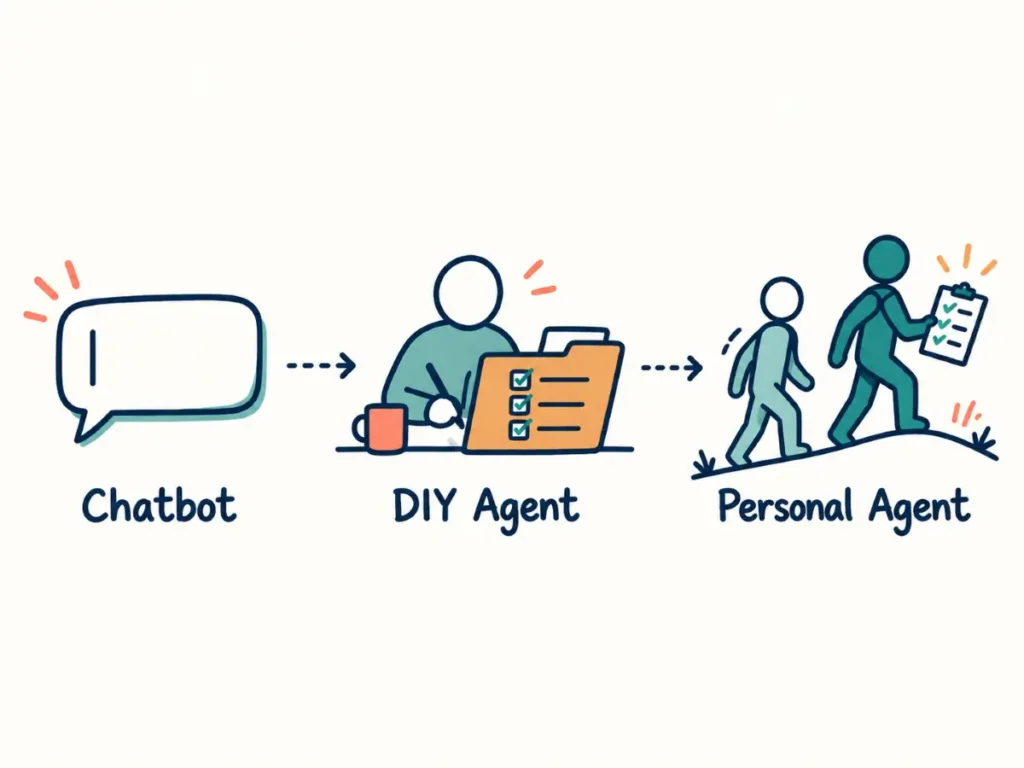
Personal AI agents are designed to keep working between conversations, remember what matters and approach you when something needs attention. For tourism operators, they could turn AI from a tool you open into a helper that watches selected parts of the business and prepares the next action.
They are new, changing quickly and capable of making mistakes. The useful question, therefore, is not which company has the best one. It is whether an always-on agent would solve a real problem in your business, and what access you would be comfortable giving it.
- What is a personal AI agent?
- How are chatbots, DIY agents and personal agents different?
- Which AI agent tools are available now?
- How could a personal agent help a tourism operator?
- What are the safety and platform lock-in risks?
- How should you get started with personal agents?
- Frequently Asked Questions
- Conclusion
Which AI agent tools are available now?
The main AI companies now offer chat, DIY or work-agents and personal-agent products. This directory reflects official product information available in October 2026. Access depends on plan, country, device and staged rollouts.
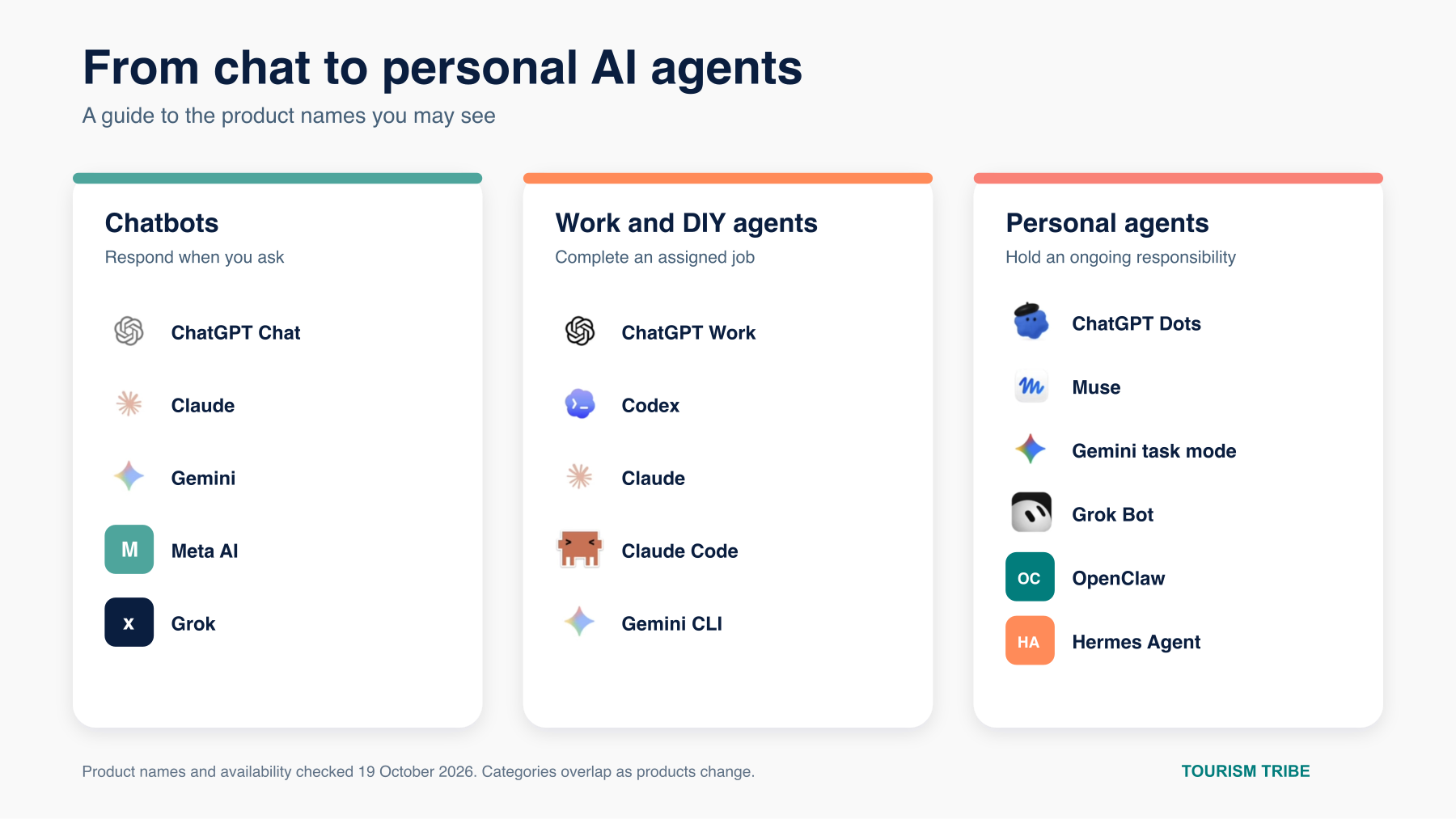
| Company or project | Chat product | Work or DIY agent | Personal agent |
|---|---|---|---|
| OpenAI | ChatGPT Chat | ChatGPT Work and Codex | ChatGPT Dots |
| Anthropic | Claude | Claude for agentic work (formerly Cowork) and Claude Code | No separate personal-agent product announced |
| Gemini | Gemini CLI | Gemini task mode (formerly Spark) | |
| Meta | Meta AI | No separate DIY work product | Muse |
| xAI | Grok | No direct equivalent in this category | Grok Bot |
| Independent open source | Varies by chosen model | OpenClaw and Hermes Agent | OpenClaw and Hermes can be configured as always-on personal assistants |
Listed above are product names, not a ranking. Meta’s Muse has received a lot of early attention, but it is one option in a young category. ChatGPT Dots, Gemini task mode and Grok Bot all take different approaches, while OpenClaw and Hermes suit people who want more control over where the agent runs and which AI model it uses.
Availability and cost vary. As of October 2026, Google lists Gemini task mode for eligible adults with a personal Google Account and a Google AI Pro or Ultra plan; work or school accounts are excluded, and other feature, region and device requirements apply. Meta says Muse is rolling out in the US and is free for most needs, with paid subscription plans also offered. Australian operators should check eligibility before choosing either tool.
What is a personal AI agent?
A personal AI agent is an AI tool that can remember ongoing context, work across connected apps and continue working after you close the chat.
Most personal agents run on a dedicated computer in the cloud. This lets them keep working when your laptop is closed. Depending on the product and the permissions you grant, they may use a browser, access connected apps, create files, fill in forms or prepare actions for your approval.
The phrase “personal agent” does not mean the AI has human judgement. It means the tool can retain context, run for longer periods and take more initiative than a standard chat window. It can monitor information, take action and bring something to your attention before you ask.
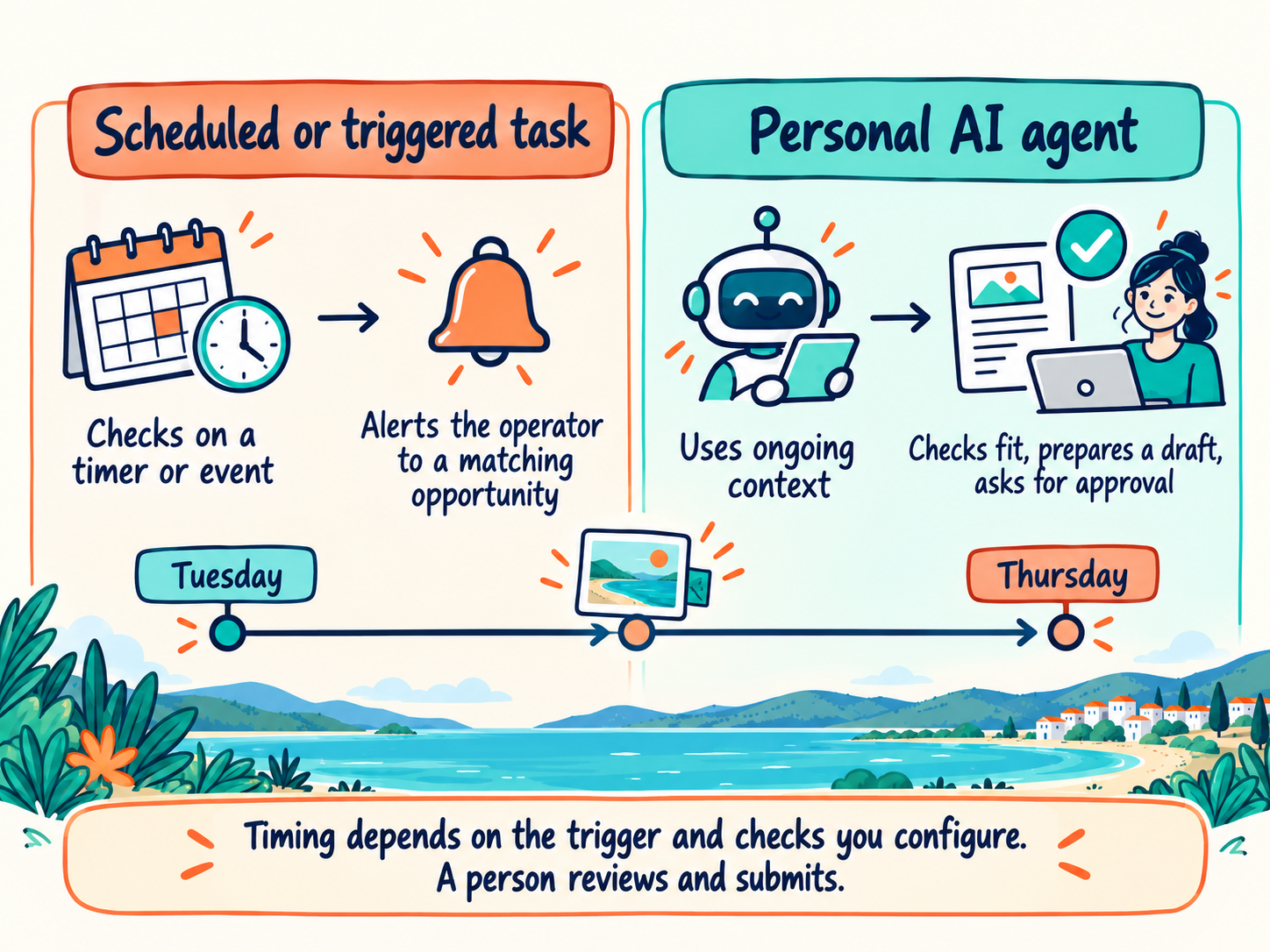
That last part is a useful distinction, although product features overlap. A chatbot usually waits for a question. A work or DIY agent can start when asked, on a schedule or, where supported, when an event occurs in a connected app. A personal agent can hold an ongoing responsibility and use accumulated context to coordinate follow-up work, such as preparing a briefing before a regular meeting or flagging a change that may affect upcoming guests. Its response still depends on the sources, triggers, permissions and checks you configure.
How are chatbots, DIY agents and personal agents different?
The easiest way to understand the step change between the chatbots, DIY (or work) agents and personal agents is to look at who starts the work, what the AI remembers and where the work happens.
Chatbots respond to the task in front of them
ChatGPT, Claude and Gemini started as chatbots. You open a conversation, ask for help and receive an answer. They are useful for one-off work such as drafting a reply, improving a tour description or summarising a document.
Chatbots may have memory, projects and connected files, but the user still leads the interaction. You decide when to open the tool and what to ask.
DIY or work agents carry out multi-step jobs when asked, scheduled or triggered
Tools such as ChatGPT Work, Claude, Claude Code, Codex and Gemini CLI can work with files, instructions and connected tools. You can give them a goal, let them plan the steps and review the completed work.
The “DIY” label describes the setup as much as the technology. You decide how folders are organised, which instructions apply and what sources the agent should use. This gives you control and makes it easier to keep your business knowledge in portable files. It also takes more work to set up well.
ChatGPT Work tasks sit within this stage. They can run on a schedule or, for supported connections, start from events such as a new Gmail message or Slack channel message. A task still needs a clear scope and appropriate permissions. Our guide to setting up ChatGPT scheduled tasks for a tourism business explains how to give a recurring task sources, rules, an output and a human review step.
Personal agents can take ongoing responsibility, deciding when action is necessary
Personal agents add persistence and initiative. You give the agent a goal or area to monitor, connect the information it needs and set boundaries. It keeps working in the background, then returns with a result, a question or a suggested next step.
The boundaries between these categories are already blurring. Claude can now continue work after you close your laptop. Google now calls Spark Gemini task mode. ChatGPT Dots can create tasks in ChatGPT Work and Codex. The names will keep changing, so focus on the behaviour rather than the label.
Chatbots still have a place. A one-off question does not need an always-on agent with access to your inbox, calendar and files. Use the least powerful tool that can safely complete the job.
An illustrative time-sensitive opportunity
Here is an illustrative scenario, not a reported client result. A small tour operator checks for partnership opportunities every Monday. On Tuesday, their regional tourism organisation announces a national travel media campaign with expressions of interest closing on Thursday. A Monday-only check would miss the deadline. A more frequent scheduled check or a supported event trigger could catch it in time. A personal agent with access to the approved source and the operator’s eligibility rules could also flag the opportunity, check the criteria and prepare a draft expression of interest for human review and submission. The benefit of the personal agent is coordinating those steps with business context; timely detection depends on the checks and triggers you configure.
How could a personal agent help a tourism operator?
A personal agent is most useful when a task depends on timing, several sources and accumulated knowledge about the business. It should remove monitoring and preparation work while leaving consequential decisions with a person.
Consider this hypothetical example of a guided tour operator preparing for tomorrow’s departures. A daily task checks weather and road conditions at 8 am. At 2 pm, the relevant authority posts an access closure affecting one route. An 8 am-only check would not pick it up until the next day. A more frequent check or a supported alert trigger could identify it sooner.
A personal agent could check an approved official alert source during operating hours and use the operator’s procedures to prepare a response. If it detects a relevant closure, it could:
- Check which departures and guests may be affected.
- Read the operator’s approved contingency procedure.
- Prepare an alternative route and a draft guest message.
- Ask the operator to approve the change and communication.
- Record the decision in the day’s operations notes.
Detection is only as timely as the configured alert feed, trigger or check frequency. The agent could help connect a verified official notice with bookings and procedures, but the operator should check the source and last check time, keep a manual fallback for missed alerts, and approve any tour change or guest message before it is sent.
Other useful starting points include:
- Watching an approved list of event, transport or destination sources and preparing a weekly guest briefing.
- Checking new reviews, matching them to your response guide and drafting replies for approval.
- Monitoring outstanding invoices or supplier deadlines and flagging the ones that need attention.
- Preparing a daily operations briefing from the booking calendar, weather, staff notes and known access issues.
- Tracking changes to grants, permits or industry programs that match rules you have already set.
- Gathering source material for marketing and preparing drafts without publishing them.
The strongest uses are specific. “Help me run my business” is too broad. “Monitor these three official sources for changes affecting departures in the next seven days, then prepare a draft response for approval” is a job you can test.
What are the safety and platform lock-in risks?
Personal agents need more access to be useful, which also increases the consequences of a mistake. Start with narrow permissions and keep approval gates on anything that sends, publishes, spends, deletes or changes a booking.
The main risks are:
- Excessive access: an agent may receive permission to read far more than the task requires.
- Prompt injection: instructions hidden in an email, document or web page may try to manipulate the agent.
- Incorrect actions: the agent may misread a date, select the wrong guest record or act on incomplete information.
- Sensitive information: inboxes and shared drives often contain passports, payment details, health information and staff records.
- Platform lock-in: memories, routines and connections become harder to move as the agent learns more about the business.
- Unclear data handling: retention and model-training settings differ between personal, business and enterprise plans.
Our guide to connecting AI safely to your tourism business explains the “lethal trifecta”: an AI can read untrusted content, access private data and send information outside the business. Removing any one of those conditions reduces the risk.
For an early trial, give the agent read access to a small set of low-risk sources and let it create drafts only. Review its activity log. Check whether every result can be traced back to the source. Expand its access only when the value is clear and the review process is working.
Initially choosing to test a product because it already connects to the systems you use may be sensible, but building your whole operating memory inside one platform makes changing providers harder later.
Reduce lock-in by keeping your source material outside the agent. Store procedures, voice rules, product information and decision records in formats you can export and, as much as possible, in files or systems you control. Record which apps are connected and which permissions have been granted. If you change platforms, your business knowledge should move with you.
How should you get started with personal agents?
Personal-agent access varies by product, plan, country and device. Some options are free, while others require a paid plan or a particular type of account. Before testing one, check its current availability and the permissions it needs. Start with a recurring problem that currently requires someone to watch, gather and prepare. Avoid customer-facing or financial actions for the first trial.
- Choose one narrow responsibility. Pick a task with clear sources and a result you can verify.
- Write the rules before connecting anything. State what the agent may read, what it may prepare and what always needs approval.
- Use low-risk information first. Public event listings, public weather alerts and a test calendar are safer than a live inbox or booking system.
- Keep outputs in draft. Do not let the first version publish posts, email guests, change bookings or make purchases.
- Review the first runs closely. Check accuracy, timing, source use and whether the agent stopped when it should have asked.
- Keep a portable record. Save the instructions and source documents somewhere you control.
You do not need to adopt a personal agent now. For many tourism businesses, a well-built ChatGPT Work or Claude workflow, supported by a few scheduled tasks, will cover the immediate need. Personal agents become useful when proactive monitoring or coordination would remove a genuine burden.
Want help choosing what to automate?
Tourism Tribe can help you identify the right starting point, document the process and put safeguards around it. Start with a GEO Assessment to understand your online presence, use a Digital Direction Plan to set priorities, and get ongoing help through a AI Enablement Plans or 1:1 coaching.
Frequently Asked Questions
What is a personal AI agent?
A personal AI agent is an AI tool that can remember ongoing context, work across connected apps and continue working between conversations. Some can monitor information and approach you with a result or question before you send a new prompt.
How is a personal agent different from ChatGPT Work?
ChatGPT Work is designed for handing over a defined task, such as researching a topic or creating a document from your files. A personal agent such as a ChatGPT dot can hold an ongoing responsibility, keep working in the background and proactively bring something to your attention. The two can also work together.
Is a personal agent the same as a scheduled task?
Not necessarily. Tasks can run at set times or, where supported, start from connected events. A personal agent may add ongoing context and coordinate follow-up work. Either approach detects changes only through the sources, triggers and checks you configure.
Which personal AI agents are available?
Current products include ChatGPT Dots from OpenAI, Muse from Meta, Gemini task mode from Google and Grok Bot from xAI. Open-source tools such as OpenClaw and Hermes Agent can also be configured as personal assistants. Availability varies by country, plan and device.
Are personal AI agents safe for tourism businesses?
They can be used safely for narrow, well-controlled work. Start with minimum access, use trusted sources, keep sending and publishing behind approval, and review the activity log. Do not begin by connecting sensitive guest data, payments and an unrestricted inbox at the same time.
Will I be locked into one personal-agent platform?
Lock-in is a real risk because the agent accumulates memories, rules and connected workflows. Keep the source documents and procedures in systems you control, choose exportable formats and maintain a record of connections and permissions.
Conclusion
Start with one tourism workflow, approved sources and a clear human review step. A scheduled or event-triggered task may be enough to catch changes; a personal agent becomes useful when ongoing context helps coordinate the next steps. Test the timing and accuracy before giving any tool broader access.

Your free AI marketing coach, right in your pocket
The free Pocket Rocket app gives you a personal AI marketing coach, website audit, weekly action plans and 5-minute tips. Built for tourism operators.