
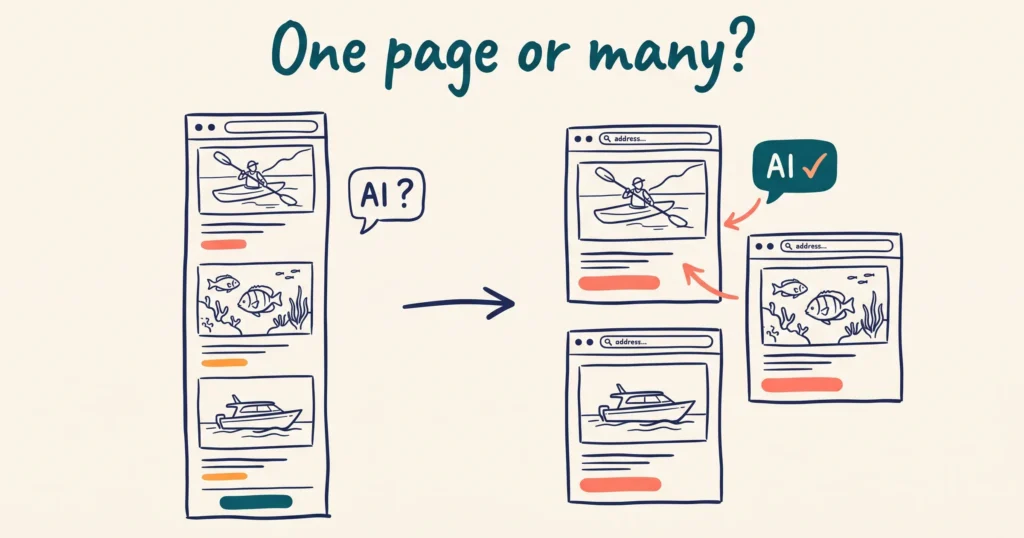
Yes, once you sell more than one experience. AI tools recommend pages, and a one-page website gives them one page for everything you sell. Give each core offering its own page and web address. Then turn the homepage into the front door that links to them.
One-page websites look clean. For a business with one product, they work. For a tour company with three tours, they give AI tools one page to describe all three.
QUICK LINKS:
- Why does a one-page website make it harder for AI to recommend you?
- Do menu links that jump down the page count as separate pages?
- When should you split a one-page website?
- What pages does a small tourism website need?
- What should each experience page include?
- How do you split a one-page website without losing what works?
Why does a one-page website make it harder for AI to recommend you?
AI tools work at product level, not business level. When ChatGPT recommends a tour, it points the traveller at a specific page. It often cites that link.
A one-page site gives the assistant a single address. It has no separate page for “the sunset kayak tour” and another for “the full-day reef tour”. That makes it harder to recommend only one of them, with a link to match. We covered this for tour pages in how to optimise your website copy to get more bookings.
We use three questions to check whether AI understands a business. What is it? What does it offer? What do customers say about it? A flat, single scrolling page makes all three harder to answer with confidence.
AI tools also cut your page into pieces before they search it. We explain this in three types of AI bot. On a dedicated page, every piece belongs to one experience. On a long page with three tours, a piece cut from the middle loses its tour’s heading. That’s our reading of how chunking works, and it’s the reason we build one page per experience.
Do menu links that jump down the page count as separate pages?
No. A menu link that scrolls down the page uses a URL fragment. That’s the part after the # in an address like yoursite.com.au/#tours. Google treats the whole thing as one page.
Google’s own guidance: “Don’t use fragments to change the content of a page, as Google Search generally doesn’t support URL fragments.”
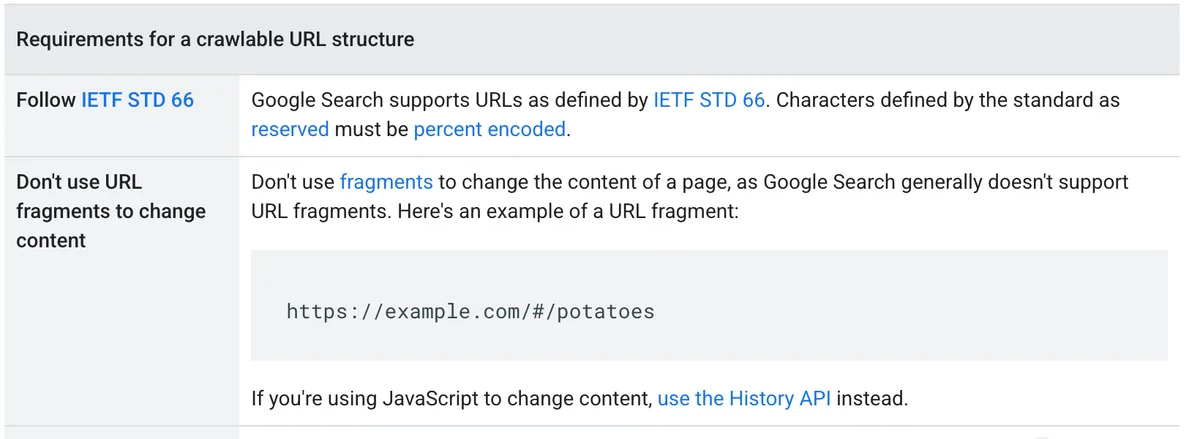
Your “Tours”, “Accommodation” and “Contact” menu items might look like separate pages. To Google, they’re one URL. No matter how much content sits below the fold, Google sees one page to index and rank.
Anchor links are fine for moving around inside a long page. They don’t replace real pages.
When should you split a one-page website?
Split it as soon as you sell two or more distinct things. Two tours. Rooms and a tour. A tour and an equipment hire service. Each of those deserves its own page.
Three signs tell you an offering needs its own page:
- It has its own price, duration or audience.
- Travellers ask different questions about it.
- You want an AI tool to name it in an answer, on its own.
A business with a single experience has less to gain from extra product pages. It still gains from a separate FAQ page and a page covering how to get there, opening hours and tickets.
Hypothetical example. A kayak operator in a coastal town runs three tours. A two-hour sunset paddle, a half-day reef trip and private charters. All three sit on one scrolling homepage. A traveller asks ChatGPT for a sunset kayak tour in that town. The site has no sunset tour page to cite. A competitor with a dedicated sunset tour page gives the assistant a page to quote and link. The operator splits the site into an overview page plus three tour pages. The tour that earns the most goes first.
Start with your highest-revenue product. Build that page first, then work down the list.
What pages does a small tourism website need?
Most small tourism businesses need five types of page. The homepage acts as a hub, and every other page has one job.
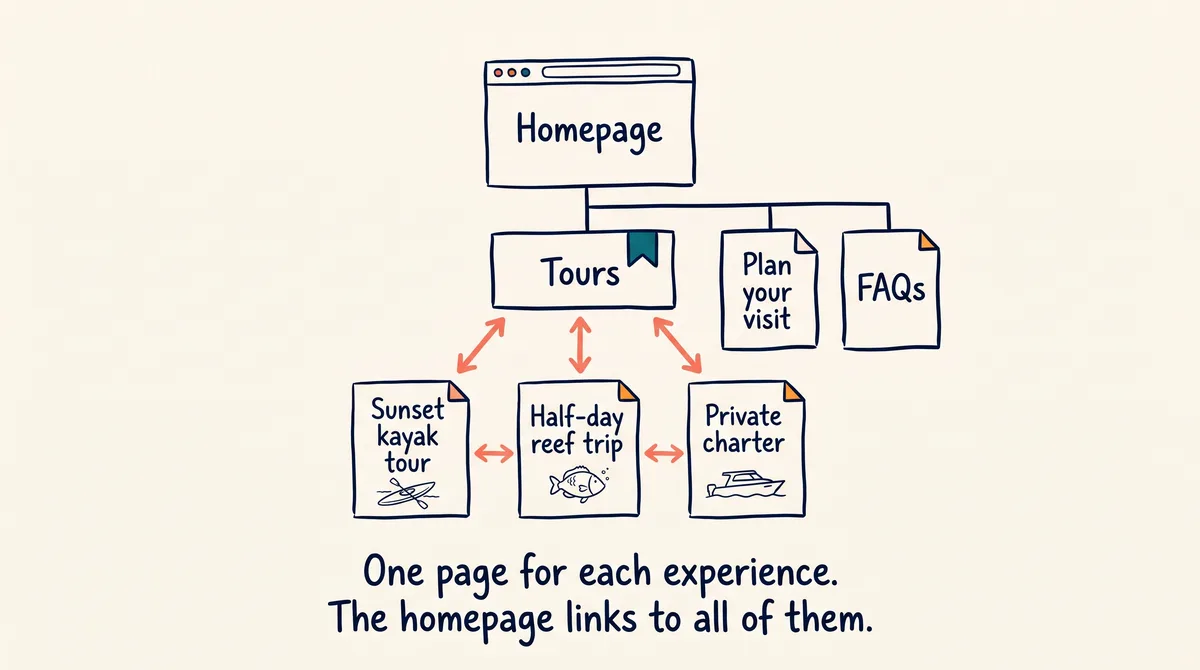
- Homepage. Each main product with an image, a one or two line description and a link to its own page. Put them within the first scroll or two, each with a clear “View” button. Our post on converting more website visitors shows the layout.
- Overview page for each category. For example “Tours” or “Accommodation”. Give it a clear heading and say who the category suits. Each experience gets a paragraph or two, a picture and a link.
- One page per experience. The full detail for one tour, room type or activity. This is the page AI recommends and the page that takes the booking.
- Plan your visit. Location, opening hours, tickets or admission, parking. One place for the practical answers.
- FAQs. A master FAQ page, plus a short FAQ section at the bottom of each experience page.
Link each experience page back to its overview page, and the overview page to each experience page. Put your contact details, location and links to every main page in the footer. That helps travellers and crawlers find their way around.
Plan this before anyone builds anything. Draw a simple sitemap and make one page template, so every experience page follows the same layout.
What should each experience page include?
Each experience page needs the facts a traveller checks before booking, written as visible text. Those are the facts AI pulls out and quotes.
State these plainly on every experience page:
- Duration, for example “2 hours” or “half day”
- Price per person, and what is and isn’t included
- Start time and departure point, with a street address or landmark
- Group sizes
- Who it suits: families, adults only, fitness level, age limits
- What to bring or wear
- Whether bookings are required and how to book
Our guide to writing website content AI quotes shows the difference between vague copy and quotable copy.
Then get the structure right:
- A descriptive web address. /tours/sunset-kayak-tour beats /page?id=42. Google’s URL guidance also recommends readable words over long ID numbers.
- A unique page title and meta description. We teach under 65 characters for the title and under 160 for the description. Google sets no fixed limit, but shortens long ones to fit the screen. Use the experience name and location in both, and in the H1.
- Question-style headings. “What is included in the tour?” beats “About our tour”. AI retrieves the section that matches the traveller’s question.
- Five to eight FAQs. Draft them with ChatGPT or Gemini from your tour description, then check every answer.
- Reviews on the page. Reviews on each product page, with schema markup, carry more weight than a general testimonials page.
- Product schema. Schema markup labels the price, rating and availability for machines. Our schema markup guide explains which types matter.
Put the detail on the page as visible text. Google indexes PDFs, but a PDF itinerary sits in a separate file, away from the page AI recommends. A price that only exists in schema code is invisible to live-fetch tools like ChatGPT. A tour that only lives in a booking widget has no page of its own. Let the widget handle the booking step.
How do you split a one-page website without losing what works?
Keep the homepage design you like and move the detail out to new pages. Work through it in this order.
- List every offering and rank it by revenue. The top one gets its page first.
- Draw the sitemap and make one experience page template. Every new page copies the template.
- Draft the copy with AI, then edit it. Paste your notes into ChatGPT or Gemini. Ask for a page draft and FAQs. Check every fact before it goes live. Ready copy means less work for your web developer, and a smaller bill.
- Move the heavy content off the homepage. Long review blocks, PDF menus and price tables belong on the experience and FAQ pages.
- Rebuild the homepage as a hub. One block per experience, with an image, a short description and a “View” button.
- Link it all together. Overview to experience and back. Blog posts to the experience they mention.
- Use the same names everywhere. Add each experience to the ticket and activity details on your Google Business Profile. Keep the name identical on your website, Google Business Profile and ATDW listing.
- Test it. Once Google indexes the pages, ask ChatGPT and Google AI Mode for your type of experience in your town. Check which of your pages they cite.
On WordPress, each new page gets its own permalink. On Wix or Squarespace, add a new page and set its URL slug, title and description in the page settings. If you want us to handle the build, our website services team does this for tourism operators.
Frequently Asked Questions
Does a one-page website hurt SEO as well as AI search?
Yes. A one-page site gives Google one URL to index and rank for everything you sell. A dedicated page for each experience gives Google a page to rank for that experience’s search terms.
Are anchor links bad for AI search?
No. Anchor links are fine for jumping to a section of a long page. They don’t create separate pages, because Google generally doesn’t support URL fragments. Use them for navigation, and build real pages for each experience.
How many pages does a small tourism website need?
One per experience you sell. Add a homepage, an overview page for each category, a plan your visit page and an FAQ page. A business with three tours ends up with around seven pages. A single-experience business needs fewer.
Does my booking widget count as a product page?
No. A booking widget usually has no standalone page AI reads or links to. Build a real page for each experience with the full detail. Embed the widget on it for the booking step.
Should I put my itinerary in a PDF?
No. Put itineraries, inclusions, meeting points and FAQs on the experience page as text. Google indexes PDFs, but a PDF is a separate file, so its facts don’t sit on the page AI recommends. Offer the PDF as an extra download if guests want it.
Will splitting my website guarantee AI recommends my business?
No. Separate pages give AI tools something specific to recommend. Reviews, schema markup, an active Google Business Profile and clear facts on each page all count too. A GEO Assessment tests how AI tools see your business and shows what to fix first.
Conclusion
A one-page website works for one product. Sell more than that, and every experience needs its own page, its own address and its own facts. Pick your highest-earning experience this week and build its page first.

Your free AI marketing coach, right in your pocket
The free Pocket Rocket app gives you a personal AI marketing coach, website audit, weekly action plans and 5-minute tips. Built for tourism operators.