
A traveller in a Brisbane cafe is planning the next leg of her trip. She skips Google and asks ChatGPT for a farm stay near Stanthorpe with a fireplace. ChatGPT names three. She books one.
Your business was in that answer or it was not. The deciding moment happened weeks earlier, on your website, while nobody watched. An AI bot arrived to read your pages. Your site let it in or turned it away.
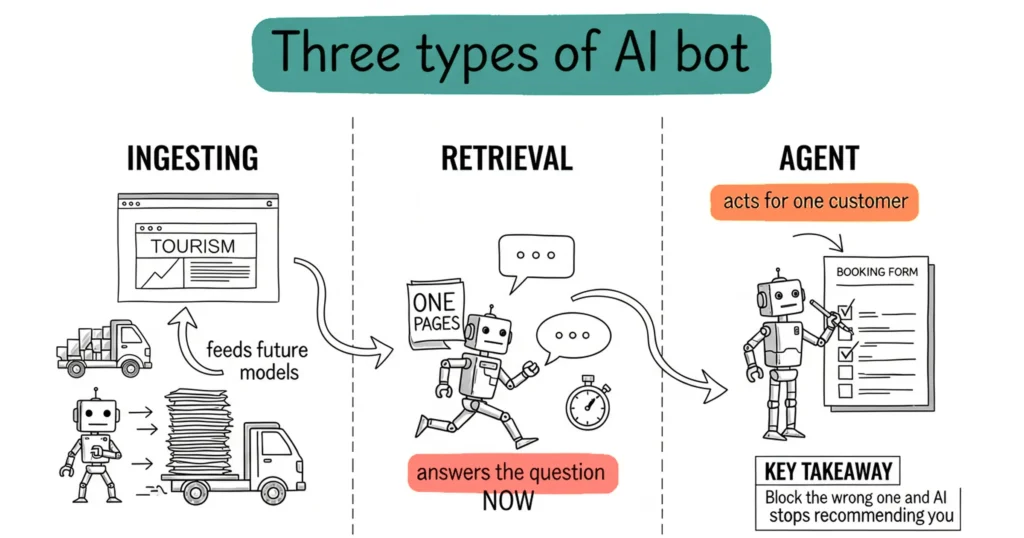
Three types of AI bots visit your website, and they do different jobs. One trains future AI models and gives you almost nothing back. One fetches your pages while an AI writes an answer about your region. One belongs to a traveller and is trying to book you right now.
Blocking the first is a fair call. Blocking the other two costs you bookings, and plenty of operators have done it by accident. The next eight minutes show you which is which. There is a two-minute check on your own site at the end.
Quick links:
- Three jobs, three groups of bots
- Agent bots work for one person and look like a human
- Schema gets you shortlisted. Write everything twice.
- The bots by name, and what each one does
- How to see which bots are reading your site
- What changes on 15 September 2026
- What DMOs should put in front of a board
- Frequently Asked Questions
Three jobs, three groups of bots
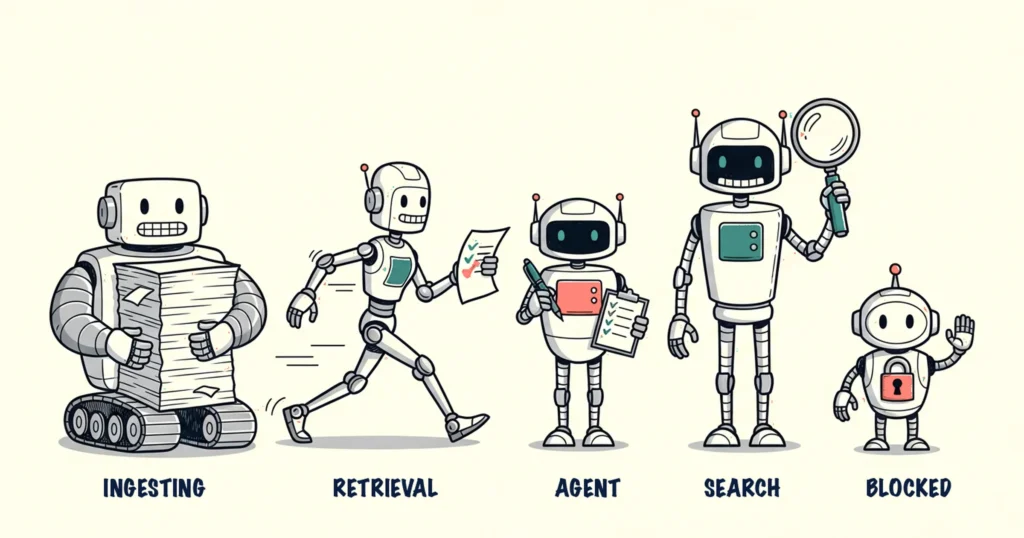
Every AI bot hitting your website is doing one of three things. Training a future model, fetching an answer for someone right now, or working through a task on one person’s behalf.
| Type | What it does | Named bots | What blocking it costs you |
|---|---|---|---|
| Ingesting (training) | Reads your pages to train or fine-tune future AI models | GPTBot, ClaudeBot, CCBot, Meta-ExternalAgent, Applebot-Extended, Google-Extended | Little today. Your content stops feeding future model versions. |
| Retrieval | Builds the index AI search draws on, or fetches your page live while an AI writes an answer | OAI-SearchBot, ChatGPT-User, Claude-SearchBot, Claude-User, PerplexityBot, Perplexity-User, Googlebot, Applebot | Everything. You cannot be cited in an answer you are blocked from. |
| Agent | Browses and clicks in real time for one person with a task | ChatGPT agent mode, Claude in Chrome, Perplexity Comet | Bookings. That bot is a customer trying to do something. |
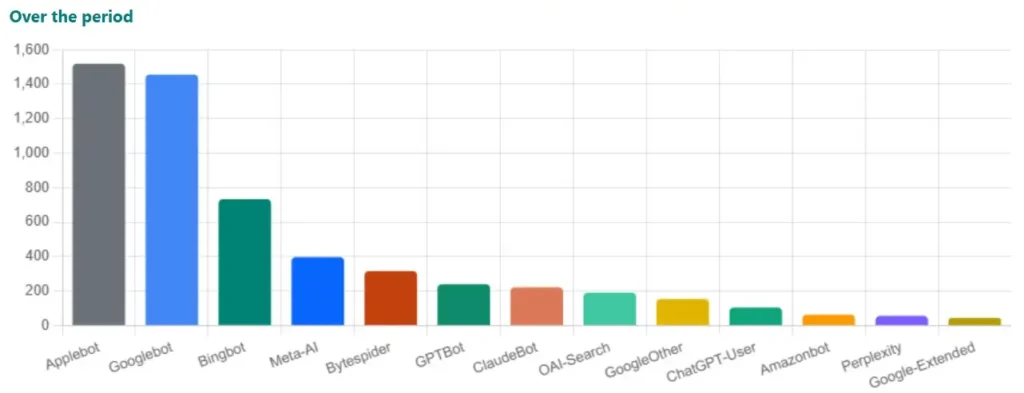
OpenAI and Anthropic both run one bot per job now, and they publish the list. OpenAI uses GPTBot for training, OAI-SearchBot to index for ChatGPT search, and ChatGPT-User when a person’s question sends ChatGPT to your page. Anthropic uses ClaudeBot for training, Claude-SearchBot for indexing, and Claude-User for user-directed fetches.
They split them so you get a real choice. You are allowed to say no to training and yes to being recommended.
Most operators block the wrong one.
Ingesting bots take your content and give back close to nothing. Cloudflare counted it. In 2026, ClaudeBot has read between 11,000 and 24,000 pages for every visitor it sent back. Google search sends you a visitor every five pages. That is the trade you are weighing.
Over half of all AI bot visits are for training. Search is under one in ten.
Retrieval bots are the ones that pay. A traveller asks ChatGPT what is open in Bundaberg on Sunday. The model has no idea. It sends a bot to your page and reads it there and then. That fetch decides whether you make the answer.
This is not a trickle. One ChatGPT question fires five to seven separate fetches of your pages.
The expensive mistake sits in robots.txt. That is a small text file on your website that tells bots which pages they are allowed to read. A lot of the “stop AI stealing your content” snippets going around are written too wide. They block PerplexityBot and OAI-SearchBot alongside GPTBot. The training block works. Your visibility goes with it.
Two bots that trip people up
Apple splits its bots the same way and almost nobody notices. Applebot feeds Siri, Spotlight and Safari suggestions, so blocking it takes you out of Siri. Applebot-Extended only decides whether your content trains Apple Intelligence. They are separate, and a rule for one says nothing about the other. Refuse Applebot-Extended, allow Applebot. That keeps you in Siri and stops the training, and it is what most big sites now do.
Google-Extended is the one that catches everyone. The name says training. It also controls whether Gemini uses your pages in live answers. Block it and you drop out of Gemini responses. The full robots.txt fix is in why doesn’t ChatGPT know my business exists.
Blocking training crawlers is a fair call and some operators make it on purpose. Make it on purpose.
Agent bots work for one person and look like a human
An agent bot is not indexing you. It has a job. Check availability. Read the cancellation policy. Fill in the enquiry form. Price you against three competitors.
This is already happening at scale. One security firm measured agent traffic in April 2026 and found browser-based agents doing most of it. The brand leaderboard changes monthly, so skip it. Some of your visitors are now software sent to do a job.
Good luck spotting them. These agents look identical to ordinary Chrome in your reports. They carry cookies, hold sessions, and click like someone in a hurry. The apps running them keep changing names. The behaviour is here to stay.
This rewrites what a good tourism website means. Hide your price, hide your availability, or run a booking form that dies without JavaScript, and the agent reports back that you are unavailable. It will not email you to check.
Schema gets you shortlisted. Write everything twice.
Schema gets you onto the shortlist. It rarely writes the answer.
Schema markup is hidden code that labels what sits on your page. Not “this page mentions tours” but “this is a bookable tour, $165 per adult, daily May to October, 4.9 stars from 84 reviews”. A digital barcode for machines, so they read the label instead of guessing from your paragraphs.
Each of the three bot types treats it differently, and that is the bit most guides skip.
Indexing bots read it and weight it. Googlebot, Google-Extended, Applebot, OAI-SearchBot and Claude-SearchBot pick up your structured data at crawl time and use it to work out who you are, what you sell, and how fresh the page is. This is where schema earns its keep. Of AI Overview citations, 82.5% come from pages carrying structured data, and only 12.4% of websites use it at all.
Live-fetch bots throw it away. When ChatGPT grabs your page mid-answer, it reads the visible words and skips the hidden code. Your schema lives in that hidden code. A price that exists only there does not exist for ChatGPT.
A controlled test made this concrete. A product price was published only in the hidden schema code and left off the visible page. ChatGPT, Claude and Perplexity all reported that the page had no pricing. The same price added as visible text was found by all three.
Gemini is the exception. It runs JavaScript and reads your structured data live, which is one more reason to keep Google-Extended unblocked.
Agent bots need it to transact. An agent adding you to a basket needs a machine-readable price and availability. Google’s Universal Cart works the same way. No readable price, nothing to add.
So the rule is boring and it works. Put every fact in the schema and in the visible text. A price that lives only in the hidden code is invisible to ChatGPT. A price buried three clicks into a booking widget is invisible to Googlebot. Write it twice and both find it.
When schema does reach the model, the answers get better. In one comparison of the same company profile with and without markup, response accuracy scored 8.6 out of 10 with schema against 6.6 without. The version with schema stopped the model inventing the wrong leadership team.
FAQ schema earns a special mention, and not for the reason most people give. AI tools cut your page into pieces before they search it, and a question often gets separated from its answer. FAQ markup keeps each question glued to its answer. That is why adding it lifts the probability of an AI Overview appearance by around 40% for pages already ranking in the top ten. Google killed the FAQ rich result for most sites back in 2023. The schema got more useful, not less.
One more field worth setting is dateModified. Generative engines filter hard for freshness on time-sensitive questions, and an accurate modified date decides whether your page gets pulled in at all.
For tourism, the types worth getting right are LocalBusiness with the correct sub-type, LodgingBusiness or TouristAttraction depending on what you run, Event for scheduled departures, Product for anything bookable, and FAQPage.
One honest caveat. Google’s own AI optimisation guide states that structured data is not a required step for AI search visibility. Do the schema anyway, and do not expect it to carry a thin page. There is a fuller walkthrough in schema markup for tourism.
The bots by name, and what each one does
Find the name in your robots.txt or your server logs, then read what it is for. They fall into the same three groups.
Ingesting bots, which train future models
Blocking any of these costs you almost nothing today. It stops your content feeding future versions of the model, and nothing else.
- GPTBot (OpenAI) collects content to train future ChatGPT models.
- ClaudeBot (Anthropic) trains future Claude models. It reads thousands of pages for every visitor it sends back.
- Applebot-Extended (Apple) only decides whether your content trains Apple Intelligence. Applebot keeps working either way.
- Meta-ExternalAgent (Meta) trains Meta’s AI models.
- CCBot builds Common Crawl, a free public dataset that many AI companies train on. One block, many trainers.
Retrieval bots, which decide whether you are in the answer
Block any of these and you vanish from that tool. This is the group operators break by accident.
- OAI-SearchBot (OpenAI) builds the index behind ChatGPT search.
- ChatGPT-User (OpenAI) fetches your page when someone asks ChatGPT a question.
- Claude-SearchBot (Anthropic) indexes your pages so Claude can find them later.
- Claude-User (Anthropic) fetches your page when someone asks Claude a question.
- PerplexityBot and Perplexity-User (Perplexity) index your site, then fetch it during a live search.
- Googlebot (Google) crawls for Google search and AI Overviews. Block this and you leave Google.
- Google-Extended (Google) sounds like a training bot. It also controls whether Gemini uses your pages in live answers, which is why blocking it hurts.
- Applebot (Apple) feeds Siri, Spotlight and Safari suggestions.
- Bingbot (Microsoft) crawls for Bing and grounds Microsoft Copilot answers.
- Meta-ExternalFetcher (Meta) fetches a page when someone asks Meta AI about it. It may ignore robots.txt, because a person asked for it.
Agent bots, which arrive with a job to do
You cannot block these by name, because they do not use one. ChatGPT agent mode, Claude in Chrome and Perplexity Comet all look like ordinary Chrome in your reports. Build for them instead: visible prices, readable availability, and a booking form that works without JavaScript.
One more you can ignore. GoogleOther handles Google’s non-search crawls for its product and research teams, and OAI-AdsBot only visits pages you submit as ChatGPT ads. Neither needs a decision.
The two suffixes worth memorising
Anything ending in -User or -Extended is telling you something.
A -User bot means a real person is waiting on the other end. Blocking it means refusing a customer.
An -Extended bot is a training-only opt-out that leaves the company’s search bot alone. It is the polite way to say no, and it is the setting most large sites now use.
Learn those two and you can make the right call on a bot that has not launched yet.
How to see which bots are reading your site
Google Analytics will not show you this. It only counts people who click through, and most AI answers end without a click. The bot visits live in your server logs, the raw visitor record your hosting company keeps. You do not need to read them yourself. Ask whoever manages your website. Start with the first check below, which takes two minutes and no technical skill.
Three checks:
- Open yourdomain.com/robots.txt. Type your own web address, then
/robots.txt, into a browser. Scan for any bot name followed byDisallow: /. Check the retrieval names first: OAI-SearchBot, ChatGPT-User, PerplexityBot, Perplexity-User, Claude-SearchBot, Claude-User, Googlebot and Applebot. Any of those blocked and you are invisible inside that tool. On Wix or Squarespace, bot access lives in your site settings rather than a file you edit. Search your platform’s help page for “robots.txt” or “AI crawlers”. - Find out whether you are on Cloudflare. Some websites sit behind Cloudflare, a service that filters traffic before it reaches your site. No idea? Ask whoever built it. If you are on Cloudflare, its firewall overrides robots.txt completely. A clean robots.txt proves nothing if Cloudflare turns the bot away at the front door. Cloudflare also shows you which AI bots visited, how often, and which pages they wanted.
- Open Google Analytics (GA4) and find the AI assistant channel under traffic acquisition. It counts people who saw an AI answer and clicked through. That is a floor, not a total. Every no-click mention is missing from it.
Read the three together. Bot visits up and Analytics sessions flat is not a failure. That is AI search working.
What changes on 15 September 2026
This section only matters if your website uses Cloudflare. No idea? Ask whoever built your site, then come back.
Cloudflare is splitting bots the same three ways and flipping the defaults on 15 September 2026. From that date, sites that have never touched their settings get Training and Agent bots blocked by default, while Search stays allowed.
Sounds tidy. Here is the part that bites.
Cloudflare applies the strictest setting to any bot doing more than one job. Googlebot crawls for search and for AI training in the same bot. Switch on a training block and Cloudflare blocks all of it, at the front door, where robots.txt gets no say. Your Google visibility goes out with the training block you wanted.
Two jobs before 15 September. Read your Cloudflare security settings instead of trusting the defaults. And if you want a training preference on record without gambling on Googlebot, Cloudflare’s Content Signals setting states it in one line and blocks nothing. It is a preference rather than a lock, so some companies will ignore it.
What DMOs should put in front of a board
Reporting website sessions to a board? That number measures less of your value every quarter.
Destination websites are down around 30% on traffic and that is not a content failure. Travellers get the answer inside ChatGPT or Google AI Mode and never click. Google AI Mode in particular sends people to the Google Business Profile rather than the website.
Three numbers to sit beside sessions:
- AI bot visits by type, from server logs. Split ingesting from retrieval. Retrieval growth tells you your content is feeding live answers.
- AI-referred sessions from the GA4 AI assistant channel. Small, growing, and the only click-based AI number you have.
- AI Overview presence on your real queries. Take your top Search Console queries, run them through Google AI Mode and ChatGPT, and record whether you are linked as a source or named in the text without a link. Linked is the strong result. Named still counts.
The answer is getting delivered somewhere else. Three data sources show that. Sessions alone will not.
Want to know how AI sees your business?
- GEO Assessment ($550): we test your business across ChatGPT, Gemini, Perplexity and Bing AI, audit your schema and structured data, compare you against competitors, and hand you an action plan.
- Digital Direction Plan (from $170/month): quarterly roadmap reviews and monthly monitoring, so bot access, schema and AI visibility get checked before they break.
- AI Enablement Plans: fortnightly AI and tech training, the full course library, and a support hotline for the weeks when the rules change again.
Frequently Asked Questions
Does blocking GPTBot stop ChatGPT from finding my business?
No. GPTBot only collects content to train future OpenAI models. Live retrieval runs through OAI-SearchBot and ChatGPT-User, which are separate bots with separate robots.txt rules. Block GPTBot for training reasons and you still get cited in ChatGPT answers.
Which AI bots should I never block?
The retrieval group: OAI-SearchBot, ChatGPT-User, PerplexityBot, Perplexity-User, Claude-SearchBot, Claude-User, Googlebot and Applebot. Add Google-Extended, because it controls whether Gemini uses your pages in live answers despite the training-sounding name. Block any of these and you drop out of answers in the tool that owns them.
What is the difference between Applebot and Applebot-Extended?
Applebot crawls for Spotlight, Siri and Safari suggestions, so blocking it removes you from Siri results. Applebot-Extended only controls whether your content trains Apple Intelligence. They read independent robots.txt rules, so allowing one says nothing about the other. Blocking Applebot-Extended while allowing Applebot keeps your Siri visibility and refuses the training.
Does schema still matter if AI strips it out?
Yes, because only the live-fetch bots strip it. Googlebot, Applebot, OAI-SearchBot and Claude-SearchBot all read your schema at crawl time, and 82.5% of AI Overview citations come from pages carrying structured data. The fix is to publish every important fact twice, once in the schema and once in the visible text on the page.
How do I tell an agent bot from a real visitor in my analytics?
Mostly you do not, and that is the point. Browser-based agents look identical to ordinary Chrome in your reports, carry cookies and hold sessions. Stop trying to detect them. Make the pages work without JavaScript, publish prices and availability as plain text, and keep forms simple enough for a bot to finish.
My Google Analytics sessions are down but bot visits are up. Is that bad?
That is the normal pattern for 2026 and it is not a content failure. Analytics only counts people who click through after an AI answer, so no-click mentions never appear. Read server-log bot visits, the GA4 AI assistant channel and your AI Overview presence together before you draw any conclusion from sessions.
Open your robots.txt this week and check the retrieval bot names against it. Two minutes, and it decides whether AI is allowed to recommend you at all. Then put 15 September in the calendar and read your Cloudflare settings before they get read for you.
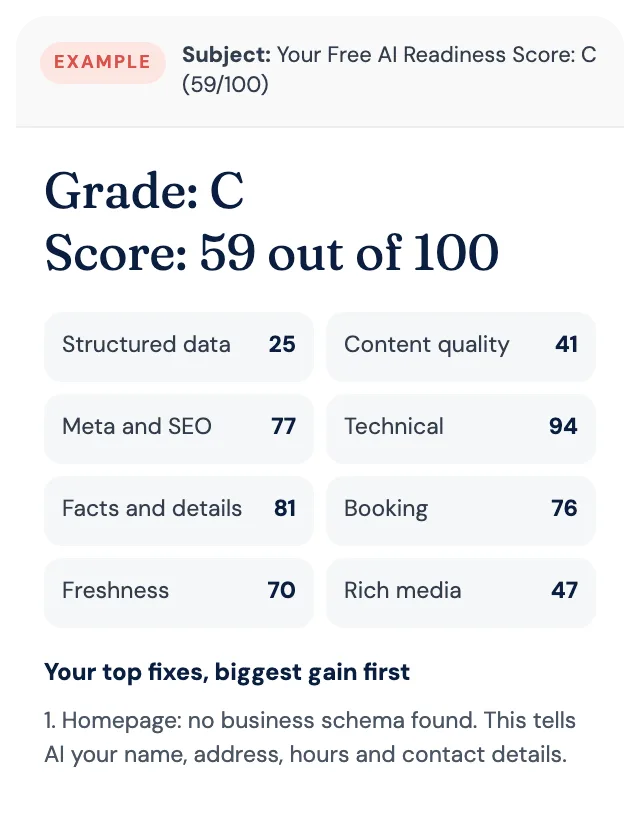
Free AI Readiness Score
How well does AI read your website?
Get your grade, a score out of 100 and your top fixes, by email. Free for tourism operators. No login and nothing to install.