
QUICK LINKS:
- Why Apple Maps and Bing matter for tourism operators
- How to register your business on Apple Maps
- How to register your business on Bing Places
- What to fill in once you’re verified
- Does Bing Places help you show up in ChatGPT?
- Keep all three listings in step
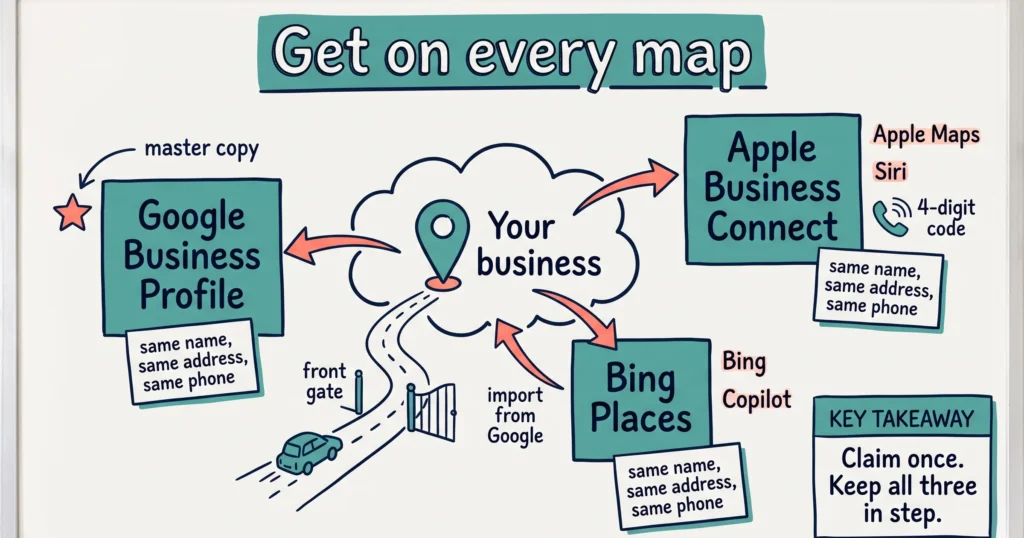
Register on Apple Maps through Apple Business Connect at business.apple.com, and on Bing through Bing Places for Business at bing.com/forbusiness. Both are free. Bing will import your Google Business Profile in a few clicks, and Apple verifies you with a phone call and a four-digit code.
Most operators set up Google years ago and stopped there. That leaves every iPhone user who asks Siri for “a winery near me” and every Bing or Copilot search running on whatever data those platforms scraped together on their own.
This guide walks through both registrations, what to fill in, and what Bing does and doesn’t do for AI search.
Why Apple Maps and Bing matter for tourism operators
Apple Maps is the maps app that comes on every iPhone. When a visitor in a hire car asks Siri for directions, a coffee or a tour, Siri answers from Apple Maps data, not Google.
Apple says its Business Connect listings reach “more than a billion Apple users across Apple Maps, Messages, Wallet, Siri, and other apps” (Apple Newsroom, January 2023).
Bing powers Bing search, Bing Maps and Microsoft Copilot. It is also one of the search sources behind other AI tools. Your Bing listing is the version of your business that Microsoft’s products trust.
If you haven’t claimed either listing, one probably exists anyway. Both platforms build place cards from public data. That means your hours, phone number or pin location might be wrong on phones you never see.
For drive-market and regional operators, this matters more. Visitors on the road use the maps app already on their phone. They don’t open a browser and search your website.
How to register your business on Apple Maps
Apple Business Connect is Apple’s free tool for claiming and editing your place card. Apple has folded it into a wider platform called Apple Business, so the sign-in page now lives at business.apple.com.
- Sign in with an Apple Account. Use a shared business email (for example hello@yourbusiness.com.au), not a staff member’s personal Apple ID. If that person leaves, you keep access.
- Search for your business. Apple shows any existing place card at your address. Claim it if it’s there. If nothing comes up, choose to add a new location.
- Enter your details. Business name, address, phone, website and category. Match your Google Business Profile exactly. Same name, same phone format, same street address.
- Place the pin. Drag it to your real entrance or check-in point. For a tour operator, that’s the departure point guests need to find.
- Verify the location. Apple’s user guide describes a phone verification: you request a call, then enter the four-digit code (Apple Business Connect User Guide). If the call option isn’t offered, Apple asks for documents instead, such as a utility bill.
Each location verifies on its own. If you run two properties or two departure points, each one goes through this step.
How to register your business on Bing Places
Bing Places for Business is Microsoft’s free listing tool. Microsoft relaunched it in October 2025 and moved it to bing.com/forbusiness (Microsoft Bing Blog).
The fastest path is the Google import.
- Clean up your Google Business Profile first. Bing copies what’s there, mistakes included. Check hours, phone, website and description.
- Sign in at bing.com/forbusiness with a Microsoft account. Again, use a shared business login.
- Choose to import from Google. Sign in to the Google account that manages your profile and pick the locations to bring across. Microsoft says the new import keeps “key attributes like business name, hours, and contact details.”
- Check the categories. Bing uses its own category list. Imported categories don’t always land where you expect, so pick the closest tourism category by hand.
- Verify. Bing confirms listings by phone, email or post depending on the business. Imported listings still go through verification.
Don’t want to connect Google? You can enter the listing by hand. It takes longer and you lose the guarantee that both match.
What to fill in once you’re verified
A verified listing with three fields filled in won’t do much. Give both platforms the same detail you give Google.
- Photos. Real photos of your property, tour or venue. Apple Maps shows them big on the place card.
- Hours, including seasonal hours. If you close for winter, say so. A visitor who drives 40 minutes to a locked gate leaves a review.
- Booking link. Apple Business Connect lets you add Actions, which are buttons like “Book” or “Reserve” that link to your booking page. Point it at your real-time booking system, not a contact form.
- Description and categories. Use plain facts: what you do, where, for whom. “Two-hour guided kayak tour on the Swan River, departs Matilda Bay daily at 9am” beats “an unforgettable adventure”.
- Showcases (Apple). Short-term promotions on your place card, where Apple offers them in your account. Use them for a seasonal special or an event.
Hypothetical example: a farm stay near Margaret River claims both listings in one afternoon. Bing imports the Google data. On Apple, the owner moves the pin from the farm’s postal address to the actual front gate, adds 12 photos, and links the “Book” Action to the booking engine. The next guest who asks Siri for directions arrives at the gate, not the neighbour’s shed.
Does Bing Places help you show up in ChatGPT?
Partly, and the honest answer is that nobody outside OpenAI knows the full recipe.
Search Engine Land tested how ChatGPT runs local searches. It found ChatGPT runs a Bing search and applies its own ranking on top, but cannot see the structured profile fields businesses manage inside Bing Places (Search Engine Land). A newer analysis from Peec AI, published September 2026, argues ChatGPT now draws on OpenAI’s own index plus several outside providers, with Yelp and Tripadvisor among its local data partners (Peec AI).
What that means for you:
- Bing Places feeds Copilot and Bing directly. That alone justifies the job.
- For ChatGPT, consistency is the signal. AI tools cross-check your name, address and phone across many sources. When Google, Apple, Bing, Tripadvisor and your website agree, AI tools describe you with confidence. When they disagree, they hedge or pick a competitor.
- Your website still does the heavy lifting. Listings tell AI tools you exist. Your website tells them what you offer, what it costs and who it suits. Read how to write website content AI can quote for that side of the job.
Keep all three listings in step
Registering once is the easy part. The listings drift apart the first time you change your hours or phone number.
- Make Google your master copy. Update it first, every time.
- Copy changes to Apple and Bing the same day. Put both logins in your password manager with a tag like “listings” so you can find every directory when something changes.
- Check them twice a year. Before peak season and before winter hours start. Search your business name in Apple Maps on an iPhone and on bing.com, and read what a visitor sees.
- Track the traffic. Add a UTM tag to the website link in each listing (for example ?utm_source=apple_maps&utm_medium=organic) so Google Analytics shows which listing sends visitors. Our guide to tracking AI traffic and your Google Business Profile covers the Google side.
For the other listings worth claiming, including Tripadvisor and ATDW, see how to add or update your business listing on third-party websites.
Frequently Asked Questions
Is it free to register on Apple Maps and Bing?
Yes. Apple Business Connect and Bing Places for Business are both free to claim, edit and verify. Neither charges for a basic listing. Apple and Microsoft sell advertising separately, and you don’t need it to appear.
Does Apple Maps use my Google Business Profile?
No. Apple Maps is a separate platform, and updating Google doesn’t change your Apple place card. Enter your details in Apple Business Connect and copy them from your Google profile word for word to keep them consistent.
How long does Apple Maps verification take?
Phone verification happens on the spot: Apple calls, you enter the four-digit code. If Apple asks for documents instead, the review takes longer. Each location verifies separately, so multi-site operators repeat the step for every address.
I already have a Bing listing I didn’t create. What do I do?
Claim it. Sign in at bing.com/forbusiness, search for your business and follow the claim steps. Then compare every field with your Google profile and fix anything out of date.
Will registering on Apple Maps and Bing get me into ChatGPT?
Not on its own. Bing Places feeds Bing and Copilot directly, and consistent listings across Google, Apple, Bing and Tripadvisor help every AI tool trust your details. ChatGPT also reads your website, reviews and other sources, so the listings are one piece of the job.
Should a tour operator list the office or the departure point?
List the place guests go. If guests meet you at a jetty or car park, that’s where the pin belongs. If you have several departure points, check each platform’s rules on separate locations before creating more than one listing.
Conclusion
Apple Maps and Bing Places cost nothing and you only set them up once. Do Bing first with the Google import, then do Apple by hand and fix the pin. Put both logins in your password manager and check them before your next peak season.

Your free AI marketing coach, right in your pocket
The free Pocket Rocket app gives you a personal AI marketing coach, website audit, weekly action plans and 5-minute tips. Built for tourism operators.