

Are you thinking “what is copywriting?”
Or, “Isn’t copywriting related to not taking other people’s work and sharing it as my own?”
First, what it is not.
Copywriting is NOT the same as copyright.
Copyright is the legal term for making sure you’re giving credit where credit is due, if you share or reference someone else’s work … but more on that in a couple of weeks.
Copywriting, on the other hand, quite simply, is writing that is designed to persuade or sell.
If your tourism website contains content (i.e. text/words) that you wrote yourself, either because you couldn’t afford to hire a professional copywriter or because you didn’t even think about it, here are 7 easy tips and tricks to make your “copy” (i.e. your content) more effective.
The focus of today’s tips and tricks will be on preparing to start writing, then the second post in this two part series will get into the nitty gritty of how to write persuasively.
Start By Brainstorming
Before you even begin writing a new page or rewriting an old one, spend at least 10 minutes doing some brainstorming.
Think “what words or phrases would my customers use to search for my products or services in Google”?
These words, which appear anywhere online, are known as keywords, regardless of whether we’re talking about one word, like “tourism”, or a 5-word phrase, like “tourism marketing for small businesses”.

Ask Your Community
Ask your community – current customers, past customers, people within your social networks, family, friends – what words or phrases they would use to describe your products or services, if they were looking for your website in Google.
Make Some Keyword Niche Lists
Once you have a list of words describing your products or services, go through the list and categorise them.
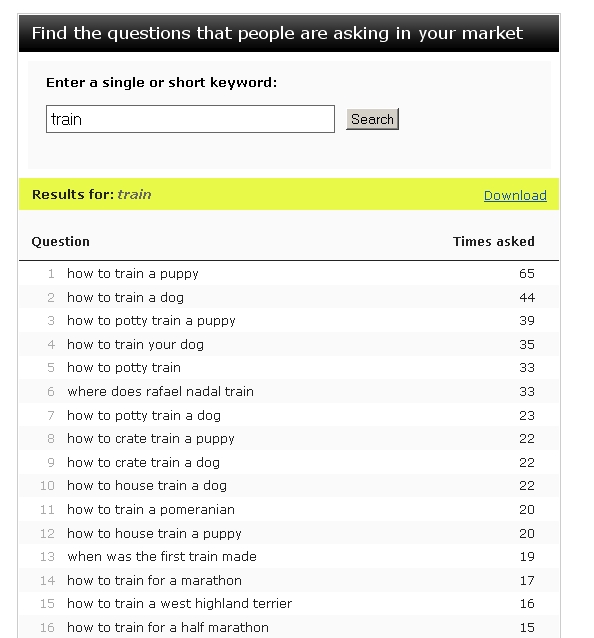
What you’re trying to achieve is to have all your words grouped into niches of similar words/phrases that relate logically to each other, a bit like the image below, which shows what people are searching for that relates to the initial (or seed) keyword of “train”.
For example, an accommodation operator might have categories like “Room Facilities”, “Resort Facilities”, or “Things To Do In Katoomba”.
Map Your Keywords To Your Pages
When you have your categories/niches, work out whether each keyword niche list could be integrated into an existing page on your website (and if so, which one) or if not, what sort of new page you could create based around that group of keywords.
Create a keyword map, in which you decide which existing page or which new page is going to be about which niche/topic.
Focus!
Then, out of each niche list, decide on one or two main keywords (remembering that a “Keyword” can have any number of actual words within it), for each page.
The idea is that these one or two words (or phrases) in each list will be the focus of each page, with the other words in your list supporting them and helping you to write the bulk of the content.
Keyword Research
Don’t know which words to choose as your focus words?
This is where a keyword research tool can be handy. There are plenty of them online, both free and paid options.
I will write a future post about some of my favourite keyword research tools, but in the meantime, you want to choose words that have a reasonably high search volume (that is, lots of people searching for the word or phrase each month) but low competition (that is, not too many other webpages that are using the same keywords).
Some keyword research tools are intended for selecting words to use in pay-per-click advertising, (e.g. Google AdWords), so you need to be careful whether the competition metric you’re looking at is for paid advertising or for organic (i.e. regular) search engine result listings. But again, I’ll explain the different tools and their pros and cons in a future post.
Where To Use Your Keywords
Once you have your focus keywords, then make sure that you use your main, primary keyword in specific sections of your webpage.
Some of the sections listed below may be gobbledygook to you.
That’s OK.
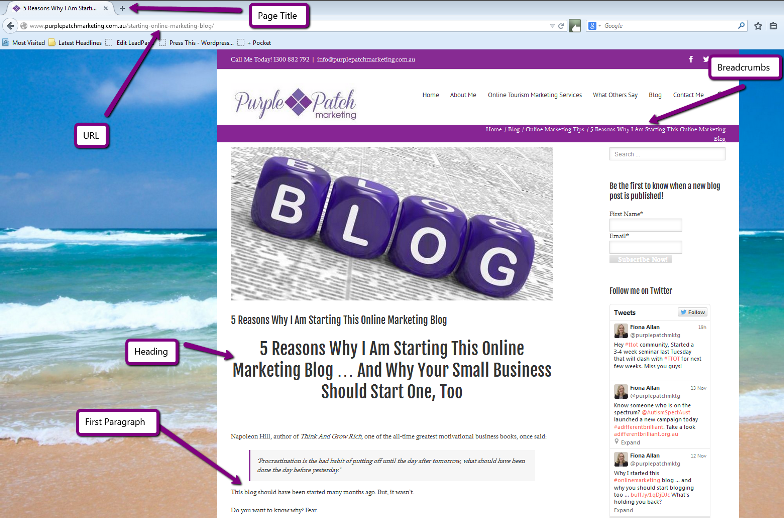
I also intend to write a future article explaining all the complex online marketing terminology in simple layman’s terms, but for now, shoot me an e-mail and I’d be only too happy to help you find the relevant sections on your own website. I’ve also included a marked up screen shot (below) that should help.
These sections include:
- Your Page Title
- Your URL
- Your Meta-Description
- The first paragraph
- The Page Heading
- The last paragraph
- Your Breadcrumbs/Navigation Menus (Optional)
OK, so be honest … was this post helpful? Did you learn something? Or was it clear as mud? If you read last week’s post, you’ll know that I’m new to this whole blogging thing, so I’m eager for feedback.
Please comment below if there were any areas of this post that you would like further clarification on … or if you have something additional to contribute to the conversation.
By Fiona Allan
Content Marketing, Copywriting, Keyword Research, Online Marketing Tips, SEO Copywriting
About the Author: Fiona Allan

Purple Patch Marketing provides online marketing and copywriting services to small businesses in the Australian travel and tourism industries. With over 10 years experience within the international and domestic tourism industry and 7+ years experience in digital marketing, Fiona Allan can help you to get your tourism business found online.
Your free AI marketing coach, right in your pocket
The free Pocket Rocket app gives you a personal AI marketing coach, website audit, weekly action plans and 5-minute tips. Built for tourism operators.