
Schema Markup for Tourism: What Google Knows About Your Business (and What It Doesn’t)
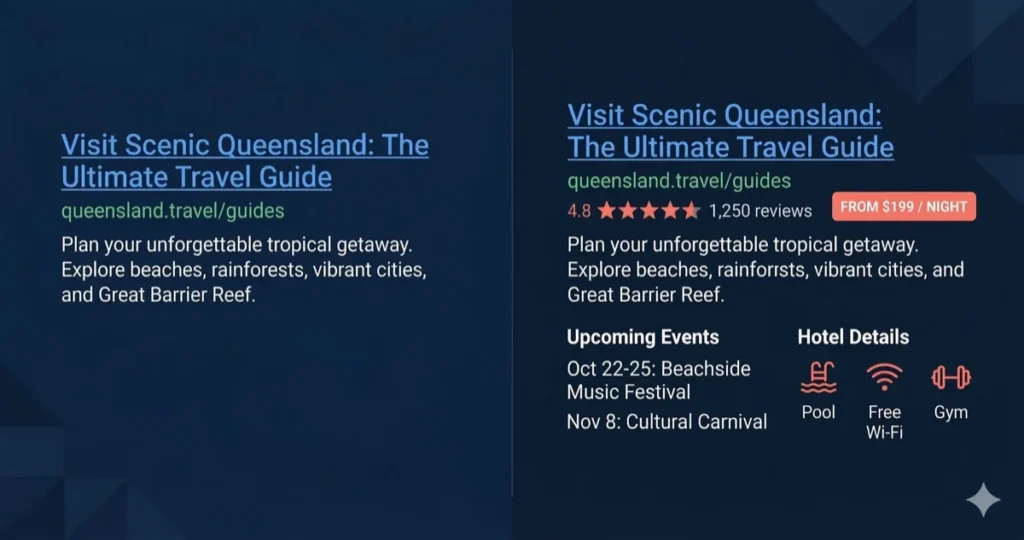
Every product in a supermarket has a barcode. The shopper never sees it. But it’s how the system knows what the product is, what it costs, and whether it’s in stock.
Your website has pages. It has text. It has photos and prices and reviews. But none of it is labelled in a way machines read automatically.
Google lands on your page and reads paragraphs. It guesses what you sell, what it costs, when it runs, and what people think of it. Sometimes it gets close. Often it gets it wrong. AI tools like Perplexity and ChatGPT do the same thing. They scan your page, try to make sense of it, and move on to a competitor whose data is cleaner.
Schema markup is the barcode for your website. It tells search engines and AI tools: this is a tour, it costs $165, it runs daily from May to October, and 84 people gave it 4.9 stars. No guessing, no misreading machine-readable facts.
If you wondered, markup is a technical term in computer science and digital publishing. It describes a system for annotating a document in a way that is syntactically distinct from its content
The businesses with barcodes get star ratings, prices, and event dates in search results. They get cited in AI answers. The ones without are an unlabelled product on a shelf. Google and every AI tool walks right past.
We checked 30 Australian tourism websites. Most had no schema | barcode at all.
What on earth is schema markup?
Google knows what Crystalbrook Riley charges per night. It knows their check-in time. It knows 2,644 guests rated them 8.5 out of 10. It knows they have three restaurants and a day spa. That’s because Crystalbrook has schema. Their barcode is in place.
Your website is written for humans. Schema is the version written for machines.
It’s a set of hidden labels in your page code. They tell Google exactly what’s on the page. Not “this page mentions tours” but “this is a bookable tour, it costs $165 per adult, it runs daily from May to October, and 84 people gave it 4.9 stars.”
Google reads those labels and builds rich search results from them. Star ratings. Prices. Event dates. Operating hours. All shown before anyone clicks your link.
Without schema, Google guesses. It reads your page text and does its best. That works for paragraphs. It fails for prices, dates, ratings, and booking details.
Schema and rich results are not the same thing
Schema markup is the data layer. It labels your content so machines understand it. Every search engine and AI tool reads it.
Rich results are the visual reward Google sometimes gives you. Star ratings. Price badges. Event dates. Those are Google’s decision, based on which schema types it chooses to display.
Not every schema type triggers a rich result. TouristTrip, TouristAttraction, and TouristDestination are all valid schema. Google reads them. It uses them to understand your content. But it doesn’t show a special visual treatment for them in search results.
Product, Event, and Hotel schema do trigger rich results. That’s why they get the most attention.
But “no rich snippet” does not mean “no value”. AI tools like Perplexity, ChatGPT, and Google’s AI Overview read all schema types equally. A TouristTrip markup on your 5-day Kimberley itinerary helps AI tools understand it’s a multi-day tour with stops, pricing, and a provider. That’s information they use when someone asks “best multi-day
tours in the Kimberley.”
Schema is for machines. Rich results are a bonus from Google. Do the schema regardless.
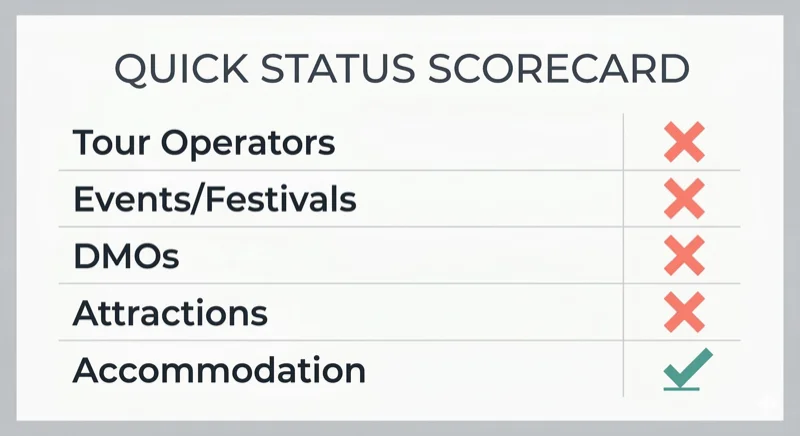
We checked 30 Australian tourism websites. Here’s what we found.
Most had no schema at all. The big guns included.
Tour operators (Experience Oz, Adrenaline, Reef Magic, Journey Beyond Rail): none use Product schema with pricing. Most have the default Yoast boilerplate and nothing else. Journey Beyond Rail runs luxury train experiences across Australia. No pricing in schema. No ratings.
Events and festivals (Vivid Sydney, Splendour in the Grass, Port Fairy Folk Festival, Bluesfest): none use Event schema. Not one. Splendour’s homepage doesn’t tell Google it’s an event. No dates, no venue, no ticket prices in structured data.
DMOs (Queensland.com, Visit NSW, Tourism Australia): near-zero tourism-specific schema. Tourism Australia’s Great Barrier Reef page has no TouristAttraction schema. Queensland.com’s Gold Coast destination page has a breadcrumb trail and nothing else.
Attractions (Taronga Zoo, Dreamworld, Luna Park Melbourne): Taronga has nothing. Dreamworld has a generic Organisation type. No opening hours, no pricing, no location coordinates.
Accommodation: Paperbark Camp, a premium glamping property in Jervis Bay, has zero accommodation schema. No check-in times, no pricing, no ratings.
Two standouts in the entire audit:
Crystalbrook Riley has full Hotel schema. Check-in and check-out times. Price range ($197-$378). Aggregate rating from 2,644 reviews. Three named restaurants. A day spa. Amenities listed. Payment methods. Pet policy. Contact details with language spoken. This is what good looks like.
Australia Zoo uses a triple type: LocalBusiness + Zoo + TouristAttraction. Opening hours for all seven days. Price range ($48-$307). Geo coordinates. Accessibility info. Tourist type specified. Social profiles linked.
Everyone else is a blue link in a sea of blue links.
What schema does your tourism business need?
It depends on what you are.
If you run tours or experiences: Product schema
This is the one that triggers rich results in Google. Star ratings, pricing, availability badges.
Use Product with Offer for pricing and AggregateRating for reviews. Include the price, currency, availability status, and a description.
If you run multi-day itineraries or package tours, use TouristTrip. This covers tours with multiple stops and days. A 5-day Kimberley tour, the Ghan rail journey, a Great Ocean Road self-drive package. Properties include itinerary (the stops in order), offers (pricing), provider (your business), touristType (who it’s for), and arrivalTime/departureTime. Google won’t give you a rich snippet for it, but AI tools read it and use it when answering questions about multi-day experiences in your region.
One trap to know about. Google prohibits businesses from marking up their own reviews on LocalBusiness pages. If you collect reviews on your own site and mark them up yourself, Google won’t show the stars. The reviews need to come through a third-party system, or you need to use Product schema (not LocalBusiness) for the review markup to be eligible.
If you run accommodation: Hotel or LodgingBusiness schema
This generates Knowledge Panel results and hotel carousels.
Include: check-in and check-out times, price range, star rating, aggregate rating, amenities, geo coordinates (five or more decimal places), address, and contact details.
If you run a holiday park, campground, or glamping operation, use LodgingBusiness as your type. If you’re a hotel, use Hotel.
Google also supports VacationRental as a separate rich result type. It needs at least eight photos (including bedroom, bathroom, and common areas), occupancy details, and precise coordinates.
If you run events or seasonal experiences: Event schema
This is the biggest missed opportunity in Australian tourism. Not a single festival or event operator in our audit uses it.
Event schema shows dates, venue, and ticket prices directly in Google search results. Eventbrite reported a 100% increase in year-over-year traffic growth after adding Event schema. That stat comes from Google’s own documentation.
Required fields: event name, start date, and physical location. Virtual-only events don’t qualify for rich results.
Add Offer for ticket pricing and availability. Add eventStatus when things change. If a tour gets cancelled for weather, mark it as EventCancelled with the previousStartDate. Rescheduled tours get EventRescheduled.
For recurring seasonal tours, use eventSchedule instead of creating a separate Event for each date.
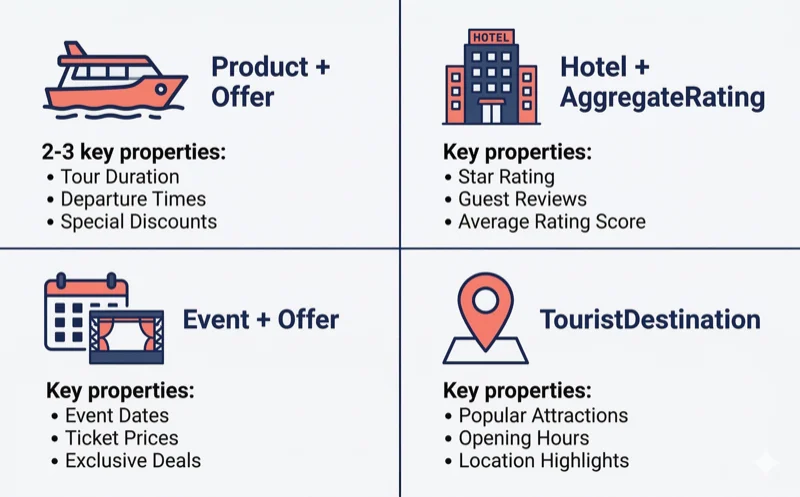
If you’re a DMO or destination body: TouristDestination + TouristAttraction
No Australian state DMO in our audit uses TouristDestination schema. The opportunity is wide open.
TouristDestination represents a region. Link it to contained attractions using the includesAttraction property. Add geo coordinates and tourist type.
TouristAttraction labels individual venues, experiences, or natural features. Include opening hours, accessibility info, whether it’s free, and a booking page link. Schema.org has a property called tourBookingPage built for this exact purpose.
If you’re any tourism business: BreadcrumbList
This is the easy win. It shows a navigational trail in Google search results. “yoursite.com > Tours > Whale Watching” instead of a flat URL.
Most WordPress sites with Rank Math or Yoast generate this automatically. Check that yours is active. It takes two minutes and makes your search listing look more professional.
If you have video content: VideoObject
Tour preview videos, destination reels, guest testimonials. Google shows rich video results in the main search, video tab, Google Images, and Discover.
Required: video name, thumbnail URL, and upload date. Add duration, description, and content URL. If your video has chapters, add Clip markup so Google shows key moments.
If you have images (you do): ImageObject
Tourism sells on visuals. Every tour page, hotel page, and attraction page has photos. Most of them are invisible to search engines.
An image file on your page has a filename and an alt tag. That’s all Google gets. ImageObject schema adds a caption, a description, the photographer’s name, a licence, geo coordinates of where the photo was taken, and what the image represents.
For tourism, this matters in three places.
Google Images search. People search “glamping Jervis Bay” and browse images. Schema-labelled images with descriptions and location data rank better than unnamed files. Google shows richer image results when it knows what the photo contains.
AI image understanding. AI tools pull images into search answers. Labelled images with clear descriptions are more likely to be selected and attributed. An image with schema saying “Sunset kayak tour on Sydney Harbour, photographed from Circular Quay” gives AI tools something to work with. A file called IMG_4382.jpg gives them nothing.
Google Discover and visual stories. Google’s Discover feed favours pages with high-quality, labelled images. Schema helps Google identify which images represent your content.
The basics: add proper alt text to every image (you should be doing this already for accessibility). For key images on product pages, add ImageObject schema with name, description, contentUrl, and creditText. If the photo has a location, add contentLocation with geo coordinates.
In WordPress, Rank Math and Yoast add basic image schema automatically. For richer markup (location data, credits, licensing), add it through custom fields or a code snippet.
Most tourism websites have hundreds of photos and zero image schema. Fix your hero images and product gallery images first. Those are the ones Google shows in search.
The booking widget problem
This is bigger than one platform.
FareHarbor, Rezdy, Bokun, Checkfront, Xola, Peek, Regiondo. If your booking system loads inside an iframe or a JavaScript widget, Google cannot read the content inside it.
That means your tour prices, availability, and booking details are invisible to search engines. Even though they’re sitting right there on the page.
But here’s the real issue. Many operators use the booking widget as their product page. The widget shows the tour name, the description, the inclusions, and the pricing. The page itself has a heading and a widget embed. Nothing else.
That doesn’t cut it.
You need to write your product content on your own page. Tour description, pricing, duration, inclusions, start times, location. All of it. In your own words, on your own site, in a format Google reads.
Then add the booking widget separately for the transaction. The widget handles the booking. Your page handles the content and the schema.
If the only place your tour details exist is inside a third-party widget, you don’t have a product page. You have a booking form with no context.
Schema used to cost hundreds of dollars. Sometimes it still does.
Three years ago, proper schema on a tourism website meant hiring a developer.
It is not because the code was hard but it required someone who knew the schema.org vocabulary, wrote JSON-LD without mistakes, and repeated that for every product page on your site.
At $250 an hour, a thorough setup across a 20-tour site ran $100 to $2,000+. When you added new tours, you called the developer again because your site was most likely not dynamic.
Most operators skipped it. Which is why most tourism websites still have no schema, or broken schema, or the wrong type on every page.
AI coding tools have changed this. But only for the right setup.
If you have a WordPress site with custom fields and SSH or developer access, schema is now a 10-minute job. You tell an AI tool like Claude what your custom fields are called (price, duration, start_time, checkin_time, whatever your setup uses). It writes the PHP function that outputs valid JSON-LD for every product page. You add it via a Code Snippets plugin or your theme’s functions.php. Every product page gets valid schema. New pages inherit it automatically because the function reads from the fields.
That’s the best case. Here’s when it doesn’t apply.
If your site is on Wix or Squarespace, you don’t have custom fields or SSH access. Schema has to be added as static JSON-LD code blocks on each page. It’s manual. It doesn’t update when your prices change. And it still costs a few hundred dollars if you hire someone to do it properly across 20 product pages.
If your WordPress site stores product info in page content instead of custom fields, no AI tool writes your schema for you. The data needs to live in structured fields (price in a price field, duration in a duration field) not typed into a paragraph in the block editor. Custom fields are worth setting up regardless. Schema is one more reason.
If you don’t have developer access to your own site, you’re limited to what your SEO plugin offers. Rank Math and Yoast let you set schema types and fill in basic fields per page. That covers the fundamentals. For dynamic schema that reads from custom fields and applies across every product page automatically, someone needs code-level access.
The gap between a well-set-up WordPress site and a DIY Wix site is still real. AI tools closed the gap on the coding. They didn’t close the gap on the platform.
If you need schema for your tourism business, we can implement this for you.
Schema and AI search: the evidence is building
A year ago, the case for schema helping AI search was mostly theoretical. That’s changed.
In early 2025, Google and Microsoft both stated publicly that they use schema markup for their generative AI features. Google was explicit: structured data is critical for modern search because it’s efficient, precise, and easy for machines to process.
The numbers back it up. Pages with structured data are 3.2 times more likely to be cited in AI-generated responses than pages without. A BrightEdge study found that schema markup improved brand presence and citation rates in Google’s AI Overviews. In 2025, pages using schema had 58% higher visibility in AI snippets compared to non-schema pages.
A controlled test by Search Engine Land built three identical pages with different schema treatments: well-implemented, poorly implemented, and none. The page with proper schema was the only one to appear in an AI Overview. The page with no schema was never indexed at all.
82.5% of AI Overview citations come from pages with structured data. Only 12.4% of websites use structured data at all. The gap between those two numbers is the opportunity.
AI-referred traffic jumped 527% between January and May 2025. These tools are pulling information from somewhere. Schema tells them where to pull it from and what it means.
This matters for tourism specifically. When someone asks Google’s AI Overview “best whale watching tours in Hervey Bay” or asks Perplexity “glamping near Jervis Bay with hot tub”, the AI builds an answer from pages it trusts. Pages with clear Product schema, pricing in Offer markup, and ratings in AggregateRating give the AI structured facts to cite. Pages with unstructured paragraphs give it nothing to grab.
Schema won’t guarantee you get cited. Content quality, authority, and relevance still matter. But without schema, you’re asking AI tools to guess what your page contains. With schema, you’re telling them.
FAQPage schema: dead for Google, alive for AI
In August 2023, Google restricted FAQ rich results to government and health websites. Tourism businesses no longer get the expandable FAQ dropdown in standard search results.
Many SEO guides now say FAQ schema is dead. They’re wrong. They’re looking at Google rich results only. The value has shifted to AI search. And the data says FAQ schema is now more valuable than it was before.
Pages with FAQPage markup are 3.2 times more likely to appear in Google AI Overviews than pages without. FAQ schema has one of the highest citation rates among all schema types for AI search. For pages already ranking in Google’s top 10, adding FAQ schema increases the probability of appearing in AI Overviews by about 40%.
The question-and-answer format mirrors how AI tools present information. ChatGPT, Perplexity, and Google’s AI Overview all generate answers in Q&A style. When someone asks Perplexity “how much does whale watching cost in Hervey Bay?”, it looks for pages that answer that question directly. FAQ schema labels the question and the answer in a format machines parse without guessing.
78% of AI-generated answers use list formats. FAQ content is a natural fit.
Google took away the visual reward. AI search created a bigger one: being the source an AI quotes when it answers a travel question.
The rules for good FAQ content:
- Write FAQs on your product pages, not on a single sitewide FAQ page. 5-10 questions per page is the sweet spot
- Answer the questions your customers ask before booking. Pricing, cancellations, what to bring, accessibility, age limits, seasonal availability
- Keep answers to 40-60 words. Long enough for context. Short enough for AI to extract cleanly
- Each answer must be self-contained. An AI tool will pull it without the surrounding page. It needs to make sense on its own
- Use your CMS’s FAQ block (Rank Math in WordPress generates the schema automatically)
- Don’t use FAQ schema on promotional content. FAQ markup is for genuine questions and answers
- Update your FAQs monthly. Google AI Overviews favours recently updated content
Monitor how your FAQ content performs across AI tools, not only in Google. Ask Perplexity or ChatGPT a question about your destination or product type. See who gets cited. That’s the new metric.
HowTo rich results were also removed in August 2023 and have no equivalent AI benefit. Skip those.
What about llms.txt?
You’ll see this mentioned in SEO circles right now. It’s a proposed text file you add to your website root that tells AI tools what your site is about. Think of it like robots.txt but for language models.
No major AI tool has confirmed they read it. Google hasn’t acknowledged it. OpenAI hasn’t acknowledged it. Anthropic hasn’t acknowledged it. No study has shown it improves visibility in any AI search tool.
It might matter one day. Right now it’s a spec with no confirmed readers. Schema markup has confirmed readers today. Start there.
Your action this week
- Go to Google’s Rich Results Test (free)
- Paste the URL of your most important product page
- Check what schema Google detects and whether there are errors
- Then paste a competitor’s URL and compare
If your competitor has star ratings in search and you don’t, schema is the reason. If neither of you has it, you now know the gap.
Fix it in Rank Math or Yoast. Or send your developer this article and tell them to sort it.
No new tools. No monthly subscription.
Schema is table stakes. Most of your competitors don’t have it right. We checked.
Frequently asked questions
Do I need schema if I already have a sitemap?
Yes. A sitemap tells Google which pages exist. Schema tells Google what’s on those pages. They do different jobs. You need both.
Will schema help me rank higher on Google?
Not directly. Schema doesn’t change your search position. It makes your existing position more visible by adding star ratings, prices, and event dates to your listing. More people click. Same ranking.
My booking system shows all my tour info. Does that count?
No. If your booking system loads in an iframe or JavaScript widget (FareHarbor, Rezdy, Bokun, Checkfront, and others), Google cannot read the content inside it. Write your product content on the page itself, then add the booking widget for the transaction.
What schema type should I use for tours?
Product schema with Offer (for pricing) and AggregateRating (for reviews). The TouristTrip type exists in schema.org but Google has no rich result support for it. Yet it’s great for overnight tours. Product is what triggers star ratings and pricing in search.
I run a hotel. What schema do I need?
Hotel schema with check-in/check-out times, price range, aggregate rating, amenities, geo coordinates, and contact details. Look at Crystalbrook Riley’s implementation for a gold-standard example.
I run events or seasonal tours. What schema do I need?
Event schema with start date, physical location, and Offer for ticket pricing. Use eventSchedule for recurring dates. Update eventStatus if anything gets cancelled or rescheduled.
I’m on Wix or Squarespace. Does this apply?
Wix has built-in schema tools under SEO Settings. Use them. Squarespace handles basic product schema but needs a custom JSON-LD code block for tourism-specific types. A developer adds this in under an hour.
How do I know if my schema is working?
Google’s Rich Results Test. Paste your page URL. It shows what schema Google detects and flags errors. Free, takes 30 seconds.
Does FAQPage schema still work?
Google stopped showing FAQ dropdowns in search results for non-government sites in August 2023. But FAQ schema is still valuable for AI search. Tools like Google’s AI Overview and Perplexity parse FAQ content to pull direct answers. Write FAQs on your product pages and use your CMS’s FAQ block to generate the schema. The Google visual is gone. The AI value is growing.
Do my images need schema?
Your product photos and hero images do. ImageObject schema adds descriptions, location data, and credits that help Google Images search and AI tools select and attribute your visuals. Start with the main images on your product pages. Alt text is the bare minimum. Schema adds the detail that makes your images findable.
How often does schema need updating?
When your product details change (prices, dates, availability). If your schema is generated from custom fields in WordPress, it updates when you update the page. If it’s hand-coded, you update it manually.

Free resources to grow your tourism business
Sign up to get our free AI tools, checklists, roadmaps and guides, plus episodes of Untangling Tourism Tech delivered straight to your inbox.